2016. március 9., szerda

Ubiquiti Unify nuisances and the attack of the Martians

Some weeks ago I was given a nice task. A client of ours wants us to set up two new Unify APs in its network with two new wireless networks: one for guest and one for internal use. They had a Vigor 2925 to be used for firewall and DHCP role. For those who are not familiar with the wireless products named ubiquiti unify APs, here are a few links to inform:
How do I configure a "Guest Network" on UniFi AP?
Instructive reading. Based on the infos here I finally decided not to use the internal "firewall" in the APs and let the Vigor do the network separation.
UniFi - Does the controller need to be running at all times?
Official answer says "no, most of the times it is not necessary." Unfortunately this isn't entirely true with the latest firmwares. :/
No worries, since the client already had a Linux server, it looked so simple to install the controler software and setup the nodes. Sadly, everything went a different way.
For a mystical reason I couldn't make the controller software, running on the Linux, see its APs, even they were in the same subnet by their IPs and in the same broadcast domain, for the sake of Layer2 communications. I spent two days just on this riddle. Maybe it was a misconfiguration of the D-Link switches or maybe an insolvable incompatibility issue. I don't know why to this very day. :( I tried everything but the time run out so I had to find a quick solution.
So I decided to use a different network card and a second subnet on the Linux only to control the APs.
I ended up with this config:
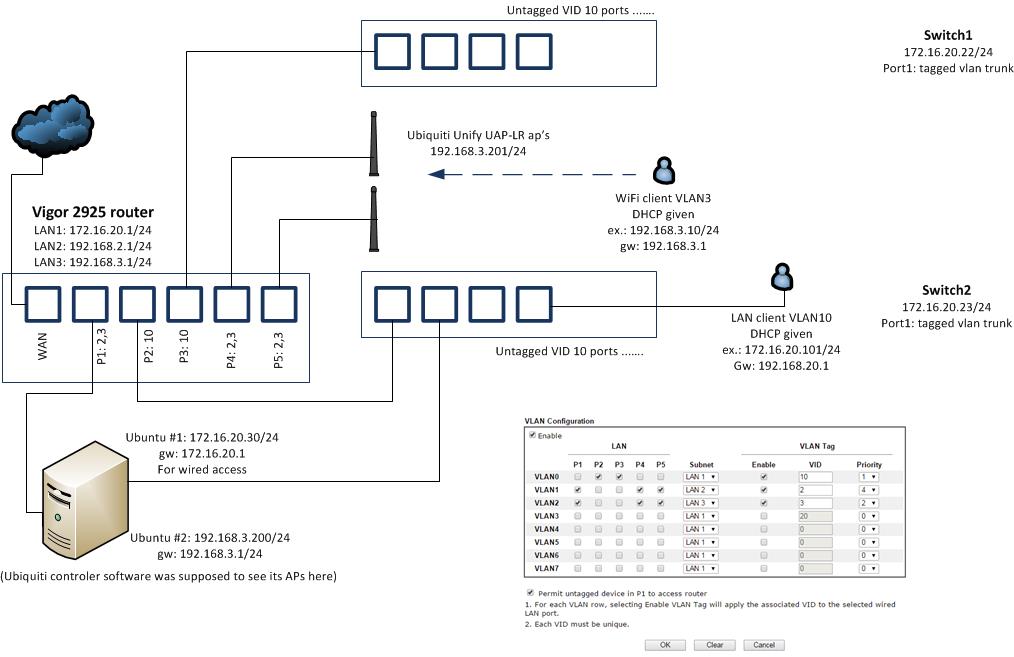
My interfaces were:
em1       Link encap:Ethernet  HWaddr 00:25:90:xx:xx:xx
          inet addr:172.16.20.30  Bcast:172.16.20.255  Mask:255.255.255.0
          inet6 addr: fe80::225:90ff:fed3:930c/64 Scope:Link
..
em2       Link encap:Ethernet  HWaddr 00:25:90:xx:xx:xx
          inet addr:192.168.3.200  Bcast:192.168.3.255  Mask:255.255.255.0
          inet6 addr: fe80::225:90ff:fed3:930d/64 Scope:Link
..
lo        Link encap:Local Loopback
          inet addr:127.0.0.1  Mask:255.0.0.0
..

APs looked working. I think Connected(limited) state is normal in this case. Note that I didn't use the built-in "guest network" feature because it's just ridiculous.


 So everything seemed properly set. But to my greatest astonishment I coudn't reach network share of my server lying on 172.16.20.30 from my internal wifi client 192.168.3.11. When I started to ping and tcpdump'ed on the server I saw that echo requests came in but replies never went back. I thought to myself: Seeing the fact that the kernel wanted to reply on the other interface (192.168.3.x) it's hardly surprising that it didn't work.
So I set IP policy routing: if the packet comes from 192.168.3.11 on em1, reply to it on the same interface -em1- instead of em2. You know, all the iptables mangle MARK and ip route add default via 172.16.20.1 dev em1 table ... stuff, etc. etc. etc.
It didn't work either. Suddenly a light dawned on me. I turned on kernel martian packet logging with echo 1 > /proc/sys/net/ipv4/conf/all/log_martians
and VOILA I saw:

Mar  2 20:08:03 superserver kernel: [ 2755.407570] IPv4: martian source 192.168.3.11 from 192.168.3.200, on dev em1
Mar  2 20:08:03 superserver kernel: [ 2755.407590] ll header: 00000000: ff ff ff ff ff ff 00 25 90 d3 93 0d 08 06        .......%......
Mar  2 20:08:04 superserver kernel: [ 2756.424025] IPv4: martian source 192.168.3.11 from 192.168.3.200, on dev em1
Mar  2 20:08:04 superserver kernel: [ 2756.424048] ll header: 00000000: ff ff ff ff ff ff 00 25 90 d3 93 0d 08 06        .......%......
Mar  2 20:08:05 superserver kernel: [ 2757.421639] IPv4: martian source 192.168.3.11 from 192.168.3.200, on dev em1
Mar  2 20:08:05 superserver kernel: [ 2757.421661] ll header: 00000000: ff ff ff ff ff ff 00 25 90 d3 93 0d 08 06        .......%......

It's a bit confusing isn't it ?!?! 192.168.3.200 is my own server!
I tried to turn off the Martian protection with echo 0 > /proc/sys/net/ipv4/conf/all/rp_filter
but I learned: such a bad routing problem can not be solved with a simple fix like this.
I was thinking very hard for an hour and finally I faked the kernel with an another subnet set on my second interface:

auto em2
iface em2 inet static
    address 192.168.3.200
    netmask 255.255.255.192


Now it's working as expected:
root@:/# route -n
Kernel IP routing table
Destination     Gateway         Genmask         Flags Metric Ref    Use Iface
0.0.0.0         172.16.20.1     0.0.0.0         UG    0      0        0 em1
172.16.20.0     0.0.0.0         255.255.255.0   U     0      0        0 em1
192.168.3.192   0.0.0.0         255.255.255.192 U     0      0        0 em2

These were all done on a:
Linux 3.11.0-12-generic #19-Ubuntu SMP Wed Oct 9 16:20:46 UTC 2013 x86_64 x86_64 x86_64 GNU/Linux


2016. január 25., hétfő

Three small scrips

Hey there, long time no see. Nothing special news here, just wanted to see googlebots heading here. So here comes my first new year post, 3 minor scripts. First one is for Exchange: adds new email aliases for users from a .csv and makes it default address.

Import-Csv c:\scripts\data.csv -Header UZER,ADDRZ| Foreach{
Set-Mailbox $_.UZER -EmailAddressPolicyEnabled $false
   $user = Get-Mailbox -Identity $_.UZER
   $user.EmailAddresses+=$_.ADDRZ
   Set-Mailbox $user -PrimarySmtpAddress $_.ADDRZ
}


example of data.csv: (without any headers!)
mgibson,mel.gibson@mighty.com
ctom,tom.cruise@mighty.com
cjoe,joe.cool@mighty.com


Second one is a bit tricky. I wanted to list all my distribution groups and their members. There are lots of solutions for this, e.g. you can find an edifying blog entry here. Unfortunatelly most of these scripts don't work nowadays at Office365 Exchange because of this unpleasing nastiness:
Cannot process argument transformation on parameter 'Identity'. Cannot convert value to type "Microsoft.Exchange.Configuration.Tasks.DistributionGroupMemberIdParameter". Error: "Cannot convert hashtable to an object of the following type: Microsoft.Exchange.Configuration.Tasks.DistributionGroupMemberIdParameter. Hashtable-to-Object conversion is not supported in restricted language mode or a Data section."                                                       
Explained on reddit by PsTakuu: It's not the object being passed into the Get-DistributionGroupMember by the pipeline that is causing the issue, it's that you are shoving an entire object into the first positional parameter (Identity) and it doesn't accept hash tables.
Here's a way to recreate your issue:
Get-DistributionGroup | select -First 1 | %{Get-DistributionGroupMember $_}
Here's the way to fix:
Get-DistributionGroup | select -First 1 | %{Get-DistributionGroupMember $_.identity} 

So here is the final working solution:
foreach ($group in Get-DistributionGroup) { get-distributiongroupmember $group.displayname | ft @{expression={$_.displayname};Label="$group"}}
The results can be redirected to file like this: $( foreach (............) )|out-file file.txt
or
$result = foreach (...)
$result | out-file file.txt -append

A +1 powerlist, for bonus: 
Get-DistributionGroup|format-table -wrap -property name,emailaddresses,hiddenfromaddresslistsenabled,RequireSenderAuthenticationEnabled > c:\groups.txt

 The third supersimple linuxer script adds users to a linux system and into samba fileserver database. I don't care about real names, room numbers and so on. That also creates tricky .bat files to make it easier to attach the network drive to windows users later.

#!/bin/bash
while read line; do
uzer=$(echo $line|cut -d ':' -f1)
pazz=$(echo $line|cut -d ':' -f2)
useradd -p $(openssl passwd -1 $pazz) $uzer --shell /bin/false --no-create-home --no-user-group
echo -ne "$pazz\n$pazz\n" | smbpasswd -a -s $uzer
echo "cmdkey /add:192.168.85.254 /user:workgroup\\$uzer /pass:$pazz" > /root/batz/$uzer.bat
echo "net use m: \\\192.168.85.254\\workz /P:Yes" >> /root/batz/$uzer.bat
done < users.txt

example of users.txt:
melbigson:jydac3sS
tomcruise:hEieafS
joecool:nhi252ax


2015. november 24., kedd

LVM extension

Adding a new raid storage to an existing LVM volume. Real life example. Two new disks added to a raid mirror first.


root@mylinux:~# mdadm --create /dev/md3 --level=1 --raid-devices=2 /dev/sdd1 /dev/sde1

 root@mylinux:~# vgdisplay vg1
  --- Volume group ---
  VG Name               vg1
  System ID
  Format                lvm2
  Metadata Areas        1
  Metadata Sequence No  2
  VG Access             read/write
  VG Status             resizable
  MAX LV                0
  Cur LV                1
  Open LV               1
  Max PV                0
  Cur PV                1
  Act PV                1
  VG Size               1.80 TiB
  PE Size               4.00 MiB
  Total PE              471654
  Alloc PE / Size       471654 / 1.80 TiB
  Free  PE / Size       0 / 0
  VG UUID               iIXHn9-h7s1-6oMw-uFvl-BJMk-Jc8N-lEBRX4

root@mylinux:~# lvdisplay vg1
  --- Logical volume ---
  LV Path                /dev/vg1/home
  LV Name                home
  VG Name                vg1
  LV UUID                CcQBbz-2GAZ-TwWm-zVva-RsRW-j1H9-L6djE6
  LV Write Access        read/write
  LV Creation host, time server, 2014-02-26 14:26:05 +0100
  LV Status              available
  # open                 1
  LV Size                1.80 TiB
  Current LE             471654
  Segments               1
  Allocation             inherit
  Read ahead sectors     auto
  - currently set to     256
  Block device           252:0

root@mylinux:~# pvdisplay
  --- Physical volume ---
  PV Name               /dev/md2
  VG Name               vg1
  PV Size               1.80 TiB / not usable 4.81 MiB
  Allocatable           yes (but full)
  PE Size               4.00 MiB
  Total PE              471654
  Free PE               0
  Allocated PE          471654
  PV UUID               cnWVNt-iawf-fJxq-wgm9-dnmb-rB4y-ij5Oyg

  --- Physical volume ---
  PV Name               /dev/md1
  VG Name               VG0
  PV Size               18.61 GiB / not usable 4.88 MiB
  Allocatable           yes (but full)
  PE Size               4.00 MiB
  Total PE              4763
  Free PE               0
  Allocated PE          4763
  PV UUID               3QdqNr-g6yH-fnL6-5jEf-Jt1k-h03Y-2HPz0v


root@mylinux:~# pvcreate /dev/md3
  Physical volume "/dev/md3" successfully created
root@mylinux:~# pvdisplay
  --- Physical volume ---
  PV Name               /dev/md2
  VG Name               vg1
  PV Size               1.80 TiB / not usable 4.81 MiB
  Allocatable           yes (but full)
  PE Size               4.00 MiB
  Total PE              471654
  Free PE               0
  Allocated PE          471654
  PV UUID               cnWVNt-iawf-fJxq-wgm9-dnmb-rB4y-ij5Oyg

  --- Physical volume ---
  PV Name               /dev/md1
  VG Name               VG0
  PV Size               18.61 GiB / not usable 4.88 MiB
  Allocatable           yes (but full)
  PE Size               4.00 MiB
  Total PE              4763
  Free PE               0
  Allocated PE          4763
  PV UUID               3QdqNr-g6yH-fnL6-5jEf-Jt1k-h03Y-2HPz0v

  "/dev/md3" is a new physical volume of "3.64 TiB"
  --- NEW Physical volume ---
  PV Name               /dev/md3
  VG Name
  PV Size               3.64 TiB
  Allocatable           NO
  PE Size               0
  Total PE              0
  Free PE               0
  Allocated PE          0
  PV UUID               dQiWVr-yKXE-3l7s-2s1x-y8TD-E1w4-GCc8aF

root@mylinux:~# vgdisplay
  --- Volume group ---
  VG Name               vg1
  System ID
  Format                lvm2
  Metadata Areas        1
  Metadata Sequence No  2
  VG Access             read/write
  VG Status             resizable
  MAX LV                0
  Cur LV                1
  Open LV               1
  Max PV                0
  Cur PV                1
  Act PV                1
  VG Size               1.80 TiB
  PE Size               4.00 MiB
  Total PE              471654
  Alloc PE / Size       471654 / 1.80 TiB
  Free  PE / Size       0 / 0
  VG UUID               iIXHn9-h7s1-6oMw-uFvl-BJMk-Jc8N-lEBRX4

  --- Volume group ---
  VG Name               VG0
  System ID
  Format                lvm2
  Metadata Areas        1
  Metadata Sequence No  2
  VG Access             read/write
  VG Status             resizable
  MAX LV                0
  Cur LV                1
  Open LV               1
  Max PV                0
  Cur PV                1
  Act PV                1
  VG Size               18.61 GiB
  PE Size               4.00 MiB
  Total PE              4763
  Alloc PE / Size       4763 / 18.61 GiB
  Free  PE / Size       0 / 0
  VG UUID               ifFvFY-yt9A-w5g8-af3G-4Kf1-AJdn-Z7531i


root@mylinux:~# vgextend vg1
  Please enter a physical volume path
  Run `vgextend --help' for more information.
root@mylinux:~# vgextend vg1 /dev/md3
  Volume group "vg1" successfully extended
root@mylinux:~# vgdisplay
  --- Volume group ---
  VG Name               vg1
  System ID
  Format                lvm2
  Metadata Areas        2
  Metadata Sequence No  3
  VG Access             read/write
  VG Status             resizable
  MAX LV                0
  Cur LV                1
  Open LV               1
  Max PV                0
  Cur PV                2
  Act PV                2
  VG Size               5.44 TiB
  PE Size               4.00 MiB
  Total PE              1425483
  Alloc PE / Size       471654 / 1.80 TiB
  Free  PE / Size       953829 / 3.64 TiB
  VG UUID               iIXHn9-h7s1-6oMw-uFvl-BJMk-Jc8N-lEBRX4

  --- Volume group ---
  VG Name               VG0
  System ID
  Format                lvm2
  Metadata Areas        1
  Metadata Sequence No  2
  VG Access             read/write
  VG Status             resizable
  MAX LV                0
  Cur LV                1
  Open LV               1
  Max PV                0
  Cur PV                1
  Act PV                1
  VG Size               18.61 GiB
  PE Size               4.00 MiB
  Total PE              4763
  Alloc PE / Size       4763 / 18.61 GiB
  Free  PE / Size       0 / 0
  VG UUID               ifFvFY-yt9A-w5g8-af3G-4Kf1-AJdn-Z7531i


root@mylinux:~#
root@mylinux:~# lvextend -L+3.6TiB /dev/vg1/home
  Rounding size to boundary between physical extents: 3.60 TiB
  Extending logical volume home to 5.40 TiB
  Logical volume home successfully resized

  root@mylinux:~# vgdisplay
  --- Volume group ---
  VG Name               vg1
  System ID
  Format                lvm2
  Metadata Areas        2
  Metadata Sequence No  4
  VG Access             read/write
  VG Status             resizable
  MAX LV                0
  Cur LV                1
  Open LV               1
  Max PV                0
  Cur PV                2
  Act PV                2
  VG Size               5.44 TiB
  PE Size               4.00 MiB
  Total PE              1425483
  Alloc PE / Size       1415373 / 5.40 TiB
  Free  PE / Size       10110 / 39.49 GiB
  VG UUID               iIXHn9-h7s1-6oMw-uFvl-BJMk-Jc8N-lEBRX4

  --- Volume group ---
  VG Name               VG0
  System ID
  Format                lvm2
  Metadata Areas        1
  Metadata Sequence No  2
  VG Access             read/write
  VG Status             resizable
  MAX LV                0
  Cur LV                1
  Open LV               1
  Max PV                0
  Cur PV                1
  Act PV                1
  VG Size               18.61 GiB
  PE Size               4.00 MiB
  Total PE              4763
  Alloc PE / Size       4763 / 18.61 GiB
  Free  PE / Size       0 / 0
  VG UUID               ifFvFY-yt9A-w5g8-af3G-4Kf1-AJdn-Z7531i

root@mylinux:~# xfs_growfs /dev/vg1/home
meta-data=/dev/mapper/vg1-home   isize=256    agcount=32, agsize=15092928 blks
         =                       sectsz=4096  attr=2
data     =                       bsize=4096   blocks=482973696, imaxpct=5
         =                       sunit=0      swidth=0 blks
naming   =version 2              bsize=4096   ascii-ci=0
log      =internal               bsize=4096   blocks=235827, version=2
         =                       sectsz=4096  sunit=1 blks, lazy-count=1
realtime =none                   extsz=4096   blocks=0, rtextents=0
data blocks changed from 482973696 to 1449341952


root@mylinux:~# df -h
Filesystem            Size  Used Avail Use% Mounted on
/dev/mapper/VG0-per    19G  2.5G   17G  14% /
none                  4.0K     0  4.0K   0% /sys/fs/cgroup
udev                  3.9G  4.0K  3.9G   1% /dev
tmpfs                 795M  6.5M  789M   1% /run
none                  5.0M     0  5.0M   0% /run/lock
none                  3.9G     0  3.9G   0% /run/shm
none                  100M     0  100M   0% /run/user
/dev/sdc1             3.7T  1.9T  1.8T  52% /backup
/dev/mapper/vg1-home  5.4T  1.8T  3.7T  32% /home

2015. november 14., szombat

APC Smart-UPS plan

Sometimes it's not easy to plan a complicated UPS shutdown and startup scheme. Here are some pictures about the settings if a SmartUPS X-3000 and its management software. The UPS itself has 3 outlets, two dedicated for servers, hosting virtual machines, and one for the network devices (switches) which always have to shuwdown last and startup first. These settings are optimized by me.

General settings

A nice graphical tool to set the processes...
...in the menu of Shutdown / Outlet sequence
How could the management host, connected to the UPS via USB, shutdown the other servers? It's not a trivial question. The answer is the default.cmd. That's executed by the management software when the general shutdown process is started. Its original content and my additions are the following:

@echo off
rem
rem   Maximize for best viewing
rem   This command file provides examples of proper command file syntax
rem
rem   Command Files run by PowerChute Business Edition must be placed in this directory.
rem
rem   Use the full path name of executable programs and external command files.
rem
rem   The @START command must be used to run executable programs (see example below).
rem   For the @START command, path names that include spaces must be enclosed in quotes;
rem   arguments for the executable must be outside the quotes.  A double quote must
rem   precede the quoted path name.  For example, to execute a command file in
rem   c:\Program Files\APC\PowerChute Business Edition\agent\cmdfiles called myShut.exe,
rem   the following line should be entered in the command file:
rem
rem   @START "" "c:\Program Files\APC\PowerChute Business Edition\agent\cmdfiles\myShut.exe"
rem
@echo on
NET USE \\my-backup\IPC$ MyPa$$word /USER:my\administrator
shutdown /s /m \\my-backup /c "UPS INITIATED SHUTDOWN!" /t 15


2015. október 14., szerda

Veeam Backup & Restore 8.0 installation

I've run into this beauty recently:
[Host] Failed to install deployment service.
The Network path was not found
--tr: Failed to create persistent connection to ADMIN$ shared folder on host [Host].
--tr: Failed to install service [VeeamDeploymentService] was not installed on the host [Host].

Discussed here or here or here
Of course I had everything okay, I reached ADMIN$ share, had Remote Registry Service started and so on, all the other stuff. Found an interesting workaround:
"What happens if you deploy required packages on that server manually, and try to add it to a console afterwards? Required packages are VeeamHvIntegration.msi and VeeamTransport.msi that are located in C:\Program Files\Veeam\Backup and Replication\Backup\Packages. "
Sadly it didn't help either. Finally I got the clue here: "Creating another domain admin credentials fixes the problem."
I don't understand why in hell it failed to install with the default domain administrator but anyway, who cares. Just another a few hours to waste. So create a dedicated domain admin, e.g. veeamdeployer, with a super secure password.

Whooha, success.
My first mighty Veeam Backup backup is in progress!
File Level Restore from a Linux VM is an awesome feature from Veeam

2015. szeptember 28., hétfő

Playing around with pattern subtitution

The other day I was given a cool task that I should replace the every second occurance of a character in a line. If there are only one of that special char (e.g. a colon) then do nothing. The list itself had tousands of newlines. Digging deep into this task I've collected some nice tricks around the net I wanted to record here.
#!/bin/bash

xxx="This:is:a:test"
echo "0:" `grep -o ":" <<< "$xxx" | wc -l ` # simple count
y="${xxx//[^:]}"        #pattern matching, y= all the chars that matches the char itself
echo "1: " "$y" # prints :::
echo "2: " ${#y} # stands for the lenght of a string = 3
echo "3: " `echo $xxx | awk -F":" '{print $NF}'` # finds the last occurence and cut the original string after there = test
echo "4: " `echo $xxx | awk -F":" '{print length($0)-length($NF)}' ` # similar to above but prints the found char position in the string = 14
end=${xxx##*:}
echo "5: Last : is in column $((${#xxx} - ${#end}))" # same as above
echo "6: " `sed 's/\(.*\):.*/\1/' <<< $xxx` # cuts the string at the last occurence of : and prints the first part
echo "7: " `sed 's/.*\:/\ /g' <<< $xxx` # cuts the string at the last occurence of : and prints the rest = test
echo "8: " `sed 's/\(.*\):/\1!/' <<< $xxx` # replaces the _last_ occurence of : with a !
echo "9: " $xxx| sed 's/t$/!/' # same as above what have to specify the last char
echo "10: " $xxx| sed 's/:/!/2' # replaces the second occurence of : with !
echo "11: " ${xxx##*:} # cuts the string at the last : and prints the rest = test
echo "12: " "${xxx#*:}" # cuts out the first word, prints the rest = "is:a:test"
echo "13: " ${xxx%:*}!!!${xxx##*:} # replaces the last occurence of : with the string: !!!
echo "14: " "${xxx%?}!"  # replaces the very last character of the string with !
echo "15: " ${xxx%:*} # cuts out the last part of the string using separator : ,selecting the first parts.
echo "16: " $xxx | sed "s/:[^:]*$//"  # cuts out the last part of the string using separator : ,selecting the first parts.
echo "17: " `sed -r "s/([^:]*:){2}//" <<< $xxx` # removes the first two parts separeted by : and prints the rest= "a:test"
echo "18: " "${xxx/:/!}" # replace the first occurence without using sed
echo "19: " "${xxx//:/!}" # replace all occurences of : without using sed
echo "20: " ${xxx:5:2} # for the sake of completion, prints = is. (2 chars from the 6th char)
echo "21: " ${xxx,} # converts the first char to lowercase
echo "22: " ${xxx,,} # concerts all to lowercase
echo "23: " "${0##*/}" # prints the name of the script without using basename
#echo $xxx | awk -F: '{print $1 $2 FS $3 $4}'

2015. szeptember 24., csütörtök

How to perform an automated brick-level (mailbox level) Exchange 2003 backup

Ohh those were the easy, happy and uncomplicated times when people used Windows 2003 SBS and Exchange 2003 servers. Even if it's EOL now there are still many companies out there where managers don't give a heck to security considerations and warnings.
Restoring a relatively large Exchange database from ntbackup is one of those things that none of the sysadmins are raving about. I mean, restoring the whole database just because a skilled user accidentally deleted an "extreme-important-and-high-business-valuable" email.
It's a known sad fact that Exchange 2003 lacks the feature of keeping soft-deleted items in the database for the retention period. So in the above example you don't have any other choice than restoring everything into a second recovery database. That would be funnier if your server partitions are going full and you have no free space to fill with a second multi-gigs database.
One solution would be to use Exmerge but scripting it is maybe the largest pain in the ass I've ever seen and it still can't export mailboxes larger than 2Gigs. Forget it.
But here is my genious method to backup your users emailing daily. All you need is a Windows backup PC on the network with two hard drives: a smaller for your system partition and a larger one to store the backups. And, an Outlook 2010 installed in that system. (Ehm, just a sidenote: you don't need to activate that Outlook anyway.)

First, you need an account which has all the necessary rights to export databases. Create a user named, for example, exmerge with a super-secure password. Just to be an the safe side and be careless enough, add it to your Administrators group.
Open your System Manager and give all rights to exmerge on your Mailbox Store.


That was everything on your server. Go to your backup PC. Open your Outlook 2010 and set up the account of your exmerge user. Older versions of Outlook are no good because they don't cache shared mailboxes for offline use.
Having done, go and get a coffee.Then:

  •     In Outlook click File tab in the Toolbar
  •     Click Account Settings button, select Account Settings
  •     Select the E-Mail tab
  •     Highlight your mailbox, click the Change button
  •     Click the More Settings button
  •     Select the Advance tab
  •     Click the Add button
  •     Type the first characters of your first user's name and let Outlook resolve it with Add button.
  •     Repeat previous step again and again for all the users in your organization
  •     Click the Apply and Ok buttons
  •     Click Next, Finish, and Close buttons
Now let this PC alone and don't touch it during the next 24 hours. Hopefully one day will be enough to download all the emails your users have. It's a good idea to encrypt both hard disks in this machine because, as you may guessed already, all those highly confidental emails will get in those Outlook and your local system hard disk. The exact location you can find that cache file having .ost extension at is something like:
C:\%your user profile%\Local Settings\Application Data\Microsoft\Outlook\Outlook.ost
It will grow pretty large, similar to the size of your exchange priv1.edb file.

Okay, one day later you will have all emails cached and the Outlook GUI responsible again. Now you need a simple scheduled .bat to start Outlook. Outlook needs a few quiescent hour to syncronize all mailboxes. Let it do its jobs.
Some hours later stop it gracefully via, e.g. a runme.bat file including:
@echo off
cscript "c:\scripts\CloseOutlook.vbs"
:EXIT

and that CloseOutlook.vbs contains:
Dim oOL
Set oOL = CreateObject("Outlook.Application")
oOL.Quit

Then grab your whole folder on your C: (if you want to be sure) and copy it with a cleverly parametered xcopy or with any free backup software (e.g. Cobian Backup) onto your second drive. Don't run out of space! Make sure you keep just the sufficent number of versions of the .ost file.
How to restore? It's easy! DO NOT START your Outlook! Instead, open your Control Panel and find Mail. Open it and select Email accounts.

  • Select the Exchange account, and then click Change.
  • Click More Settings. 
  • Choose whether to work offline or online each time you start Outlook     Click Manually control connection state, and then select the Choose the connection type when starting check box.
  • Exit
  • Start your Outlook and select Offline mode.
  • Find the missing emails within the mailbox in question.
  • I am a hell damn genious!