2021. január 12., kedd

How to find domain users who have never changed their passwords

 Hey, I have not posted here since 2 years! But I'm still kickin hard, and alive. Just to save this blog from being forgotten, placing is a new entry. And... see you in 2 years again. ;)

 How to find users who have never ever freaking changed their passwords? (Those lazy bastards, in spec cases when forced pw change cannot be enabled on them.)

Get-ADUser -Filter * -Properties PasswordLastSet,WhenCreated,lastlogondate | Where-Object {$_.Enabled -eq $true -and $_.Lastlogondate -ne $null -and ( $_.PasswordLastSet.datetime -eq ($_.WhenCreated.datetime) ) }


2019. április 1., hétfő

Systemd services command cheatsheet

List of all services and their status:
service --status-all
Another way:
systemctl list-units --type service --all  
 
List just the enabled services 
systemctl list-units --type service   
or systemctl -l –type service –all
 
Stop/Start/Restart a service 
systemctl restart/start yourservicename
 
Enable/Disable the startup of a service at boot time
systemctl enable/disable yourservicename 
 
Is it enabled? 
systemctl is-enabled yourservicename
 
Uninstall/wipe a service 
rm /etc/systemd/system/yourservicename
systemctl daemon-reload
systemctl reset-failed
 
Find out the dependencies: 
systemctl list-dependencies --type service
 
Get the files related to the service:
locate yourservicename.service 

Disable the service and forbids the others from start it
systemctl mask yourservicename

list systemd unit files and their states (enabled/disabled/etc)
systemctl list-unit-files 

To see / set the default runlevel of the system
systemctl get-defaults (set-defaults)
e.g. multi-user.target or graphical.target

systemctl isolate 
explained: (stolen from internet)
The word "isolate" means run the requested unit, and make sure nothing else is running (with a few exceptions.) Since runlevels have been replaced by targets (which are more or less just a set of services that you want to be running in a certain situation, like for multi-user or graphical usage), you can switch to a "runlevel" by starting the equivalent target and stopping anything that is not part of the new target - using isolate.
systemctl isolate multi-user.target is the modern way to unload the graphic shell, which was done by init 3 previously.   You are in runlevel 5 or to be precise in graphical.target. You do runlevel 3 or systemctl isolate multiuser.target.

Another way to change target runlevel.
systemctl set-default multi-user.target (then reboot)


2018. november 23., péntek

2018. július 24., kedd

MySQL monitoring with Zabbix 3.4

If you install Zabbix Server 3.4 there is a nice template supplied with it which is called "    Template DB MySQL". That could be used for monitoring remote MySQL database performance. Unfortunately this will also not work out of the box... Your logs will get filled by " Error connecting to database: Access denied for user 'zabbix'@'localhost' to database" and...

So you should first create a database on a _remote_ mysql server for the sake of zabbix. This could be painful if security is a high concern for you but actually doesn't hold much risk.

mysql -u root -p
use mysql;
CREATE DATABASE `zabbix_db`;
GRANT ALL PRIVILEGES ON zabbix_db.* TO 'zabbixagent'@'localhost' IDENTIFIED BY 'XXXXXXYYX';
FLUSH PRIVILEGES;


 Then create the required config files:
mkdir /var/lib/zabbix # this is defined in /etc/zabbix/zabbix_agentd.conf.d/userparameter_mysql.conf file. You must have it.
cd  /var/lib/zabbix
touch .my.cnf
chown zabbix:zabbix /var/lib/zabbix -R
chmod 600 .my.cnf

And here is the secret magic: its content should be:
[mysql]
user=zabbixagent
password=XXXXXXXXXXYYX
[mysqladmin]
user=zabbixagent
password=XXXXXXXXXXYYX

Note: no special rights needed for zabbixuser for "mysqladmin". In this way all errors should be gone and you have a nice and clean MySQL performance monitoring. Tadaam.


2018. július 23., hétfő

Zabbix agent upgrade from 2.x to 3.4

It's not easy as it seems. After you execute the first steps...
wget http://repo.zabbix.com/zabbix/3.4/ubuntu/pool/main/z/zabbix-release/zabbix-release_3.4-1+xenial_all.deb
dpkg -i zabbix-release_3.4-1+xenial_all.deb
apt update
apt install zabbix-agent -y

You suddenly realize that something is definitely wrong because the agent dies.

Jul 23 14:52:22 sss systemd[1]: Failed to start Zabbix Agent.
Jul 23 14:52:22
sss systemd[1]: zabbix-agent.service: Unit entered failed state.
Jul 23 14:52:22
sss systemd[1]: zabbix-agent.service: Failed with result 'exit-code'.
dpkg: error processing package zabbix-agent (--configure):
 subprocess installed post-installation script returned error exit status 1
Processing triggers for libc-bin (2.23-0ubuntu10) ...
Processing triggers for systemd (229-4ubuntu21.2) ...
Processing triggers for ureadahead (0.100.0-19) ...
Errors were encountered while processing:
 zabbix-agent
E: Sub-process /usr/bin/dpkg returned an error code (1)


Some investigation shows /etc/zabbix/zabbix_agentd.conf.d directory does not exists and that's where the new agent looks for its configs and foolishly it does not create it. But you may have existing userparameter configs in existing /etc/zabbix/zabbix_agentd.d so the best way to continue the installation with:
ln -s /etc/zabbix/zabbix_agentd.d /etc/zabbix/zabbix_agentd.conf.d
service zabbix-agent restart
service zabbix-agent status


2018. május 11., péntek

Docker notes #2

docker ps -a = List docker containers including the stopped ones
docker logs -f [ID] = Show the logs wrote in a container
docker logs --tail 200 [ID]

docker commit [ID] (my_new_image) = Convert a container to image
(returns value: sha256:hash)

docker save -o /path/my_new_image.tar = Save a docker image to be ready to imported
docker load -i /path/my_new_image.tar = Import (load) a foreign image
docker run -it sha256:hash /bin/bash = Spin up the image and run a command in it
(you are inside the container now)

docker export [ID] > /path/ide.tar = Export a container into a .tar file
docker diff [ID] = Show the modified files inside a container since its start
docker cp [ID]:/var/log/apache2/access.log ./access.log = Copy a file from container to host

docker-compose build = Build the correctly setup container (in its directory)
docker-compose up -d = Run it
docker rm [ID] = removes an instance of the container that was run
docker rm `docker ps -a -q` = remove all stopped containers
docker rmi image-name = removes the docker image and its dependencies

docker inspect [ID] = See the details of a container
docker run -p 8080:80 = will redirect the container's port 80 to a port 8080 on the host machine's user port
docker port [ID] = will list the port mapping information

docker top [ID] = See the running processes inside of a container
docker history [IMAGE-NAME] = See the commands the container was originally created by

2018. március 26., hétfő

Systemd over NTP

Ever wondered how to setup an NTP client controlled by systemd? Here are some short steps.
Symptom:

Mar 26 19:24:43 lokalhost systemd-timesyncd[403]: Timed out waiting for reply from 118.189.177.157:123 (0.debian.pool.ntp.org).
Mar 26 19:24:54 lokalhost systemd-timesyncd[403]: Timed out waiting for reply from 103.47.76.177:123 (0.debian.pool.ntp.org).
Mar 26 19:25:04 lokalhost systemd-timesyncd[403]: Timed out waiting for reply from 128.199.123.83:123 (0.debian.pool.ntp.org).
Mar 26 19:25:14 lokalhost systemd-timesyncd[403]: Timed out waiting for reply from 139.59.219.101:123 (0.debian.pool.ntp.org).
Mar 26 19:25:24 lokalhost systemd-timesyncd[403]: Timed out waiting for reply from 202.156.0.34:123 (1.debian.pool.ntp.org).
Mar 26 19:25:35 lokalhost systemd-timesyncd[403]: Timed out waiting for reply from 128.199.87.57:123 (1.debian.pool.ntp.org).
Mar 26 19:25:45 lokalhost systemd-timesyncd[403]: Timed out waiting for reply from 128.199.169.185:123 (1.debian.pool.ntp.org).
Mar 26 19:25:55 lokalhost systemd-timesyncd[403]: Timed out waiting for reply from 103.23.208.175:123 (1.debian.pool.ntp.org).
Mar 26 19:26:05 lokalhost systemd-timesyncd[403]: Timed out waiting for reply from 172.104.55.191:123 (2.debian.pool.ntp.org).


Solution:
1. nano /etc/systemd/timesyncd.conf
2. Set your NTP server, e.g.: NTP=172.16.36.67
3. systemctl restart systemd-timesyncd.service 
4. timedatectl set-ntp true
5. Check with: timedatectl status


2018. március 8., csütörtök

Powershell applet form

It's a little known fact that it is possible to build a complete application form with pure Powershell. (Being based on .NET.). Here is an awesome example, called login.ps1. This is an applet starts a window that cannot be closed with the regular control buttons (as they are disabled) and asks two data from the user. Then it validates the data and if the data found to be invalid, flashes the input fields with red and returns to the initial state. Yeah, this was the hardest part of the development. If the data are all OK, it flashes the input fields with green color and pushes the data to the event log. This is a very very very special use case and only useful for me, but may help someone out who is just looking for a similar data input solution and gets here with google.

[void] [System.Reflection.Assembly]::LoadWithPartialName("System.Drawing")
[void] [System.Reflection.Assembly]::LoadWithPartialName("System.Windows.Forms")
$objForm = New-Object System.Windows.Forms.Form
$objForm.Text = "Long Change Answer File Information"
$objForm.Size = New-Object System.Drawing.Size(455,265)
$objForm.StartPosition = "CenterScreen"

# set this to $True to enable "close" button
$objForm.ControlBox = $false
$objForm.KeyPreview = $True

# Add Ok Button
$OKButton = New-Object System.Windows.Forms.Button
$OKButton.Location = New-Object System.Drawing.Size(180,185)
$OKButton.Size = New-Object System.Drawing.Size(75,23)
$OKButton.Text = "OK"
$OKButton.Add_Click({
    # some tricky regex to validate our very custom input data
    If( $ChangeTextBox.Text -match "\b([Cc][0-9a-zA-Z]{9}|OST#?[0-9]{6})\b" -And $LoginTextBox.Text -match "\b[a-zA-Z]\w{2,19}\b") # Valid -match "^\d{0,10}$"
    {
        $LoginTextBox.BackColor = "lime";
        $ChangeTextBox.BackColor = "lime";
        Start-Sleep -Milliseconds 600;

        $objForm.Close()
    }
    # we have two input fields and both are required to be validated
    ElseIf (-Not ($LoginTextBox.Text -match "\b[a-zA-Z]\w{2,19}\b") -And ($ChangeTextBox.Text -match "\b([Cc][0-9a-zA-Z]{9}|OST#?[0-9]{6})\b"))   # Invalid
    {
        #$ErrorProvider.SetError($LoginTextBox, "Please enter valid name");
        $LoginTextBox.BackColor = "pink";
        $ChangeTextBox.BackColor = "lime";
    }
    # strange logic but this is the simpliest way in this case, here we get back to reset the form
    ElseIf (-Not ($ChangeTextBox.Text -match "\b([Cc][0-9a-zA-Z]{9}|(OST|ost)#?[0-9]{6})\b") -And ($LoginTextBox.Text -match "\b[a-zA-Z]\w{2,19}\b"))
    {
        $ChangeTextBox.BackColor = "pink";
        $LoginTextBox.BackColor = "lime";
    }
    Else
    {
        # visual warning to the user
        $ChangeTextBox.BackColor = "pink";
        $LoginTextBox.BackColor = "pink";
    }
})
$objForm.Controls.Add($OKButton)   

# Add Textbox Label
$FontBold = new-object System.Drawing.Font("Arial",8,[Drawing.FontStyle]'Bold' )

#UserID label
$objLabel = New-Object System.Windows.Forms.Label
$objLabel.Location = New-Object System.Drawing.Size(10,20)
$objLabel.Size = New-Object System.Drawing.Size(425,20)
$objLabel.Font = $fontBold
$objLabel.text = "Please enter Your UserID"
$objForm.Controls.Add($objLabel)

$objLabel1 = New-Object System.Windows.Forms.Label
$objLabel1.Location = New-Object System.Drawing.Size(30,47)
$objLabel1.Size = New-Object System.Drawing.Size(65,50)
$objLabel1.Text = "UserName:"
$objForm.Controls.Add($objLabel1)

#UserID textbox
$LoginTextBox = New-Object System.Windows.Forms.TextBox
$LoginTextBox.Location = New-Object System.Drawing.Size(120,45)
$LoginTextBox.Size = New-Object System.Drawing.Size(260,20)
#$LoginTextBox.BackColor = "green"
$objForm.Controls.Add($LoginTextBox)

#CH label
$objLabel2 = New-Object System.Windows.Forms.Label
$objLabel2.Location = New-Object System.Drawing.Size(10,100)
$objLabel2.Size = New-Object System.Drawing.Size(425,20)
$objLabel2.Font = $fontBold
$objLabel2.Text = "Please enter change number"
$objForm.Controls.Add($objLabel2)

$objLabel3 = New-Object System.Windows.Forms.Label
$objLabel3.Location = New-Object System.Drawing.Size(30,120)
$objLabel3.Size = New-Object System.Drawing.Size(65,40)
$objLabel3.Text = "CH number:"
$objForm.Controls.Add($objLabel3)

#CH textbox
$ChangeTextBox = New-Object System.Windows.Forms.TextBox
$ChangeTextBox.Location = New-Object System.Drawing.Size(120,120)
$ChangeTextBox.Size = New-Object System.Drawing.Size(260,20)
$objForm.Controls.Add($ChangeTextBox)

# Add Validation Control
$ErrorProvider = New-Object System.Windows.Forms.ErrorProvider

$objForm.Topmost = $True
$objForm.Add_Shown({$objForm.Activate()})
[void] $objForm.ShowDialog()

$change= $ChangeTextBox.TEXT
$login = $LoginTextBox.TEXT

Write-EventLog -Source "Winlogon" -LogName "Application" -EventId 666 -Message "Impersonated user logged as $login for $change implementation"

2018. január 2., kedd

User import from foreign LDAP into own AD - PART2

The script continues with STEP3

$OutFile="C:\quser\ad-userimport-scripts\ujuserekerkeztek.txt"
$LogFile="C:\quser\ad-userimport-scripts\adderlog.txt"
$InFile="C:\quser\ad-userimport-scripts\opslistanevekkel.txt"
$WinUsers = "C:\quser\ad-userimport-scripts\winjumpusers.txt"

# we have some test users which must not be disabled
$ToIgnore = "user1","user2","user3","master1","master2"

$GrA = @() # needed!
$GrA = import-csv $InFile # external LDAP group members
$GrB = gc $WinUsers # external LDAP group members who has additional administrative permission to be imported here
$GrC=(Get-ADGroupMember -identity jumpusers).SamAccountName # members who are already in the local AD

$Gone = $GrC | where {$GrA.uid -notcontains $_ } # members who are already in the local AD but not in the foreign AD - seems like deleted there and already left the team
$ToDelete=(Compare-Object $Gone $ToIgnore).InputObject # generating the user list who are to be deleted locally
# some checks to avoid stupid errors - too short list means we caught only some error message
 $i=@(Get-Content $InFile).Length
 if ( $i  -lt 15 ) {
  write-host "There is something wrong with the list, CHECK IT !" | Out-File $LogFile -Append
  exit 1
  }
    $i=@(Get-Content $WinUsers).Length
 if ( $i  -lt 10 ) {
  write-host "There is something wrong with the list, CHECK IT !" | Out-File $LogFile -Append
  exit 1
  }

# logging
Get-Date | Out-File $LogFile -Append
# handling users who are gone meanwhile from the external LDAP
if ( $ToDelete -ne $null ) {
        $ToDelete | ForEach-Object {
            #Delete-ADaccount -Member $_ -Confirm:$false # delete
            #Remove-ADGroupMember -Identity jumpusers -Member $_ -Confirm:$false # removes from the group
            Disable-ADAccount -identity $_ # disable the user
           Write-Host "DISABLED:" $_ | Out-File $LogFile -Append
        }
    }
# Collecting the users into external data file who are not added yet locally. This is the trickiest part of the script because here we just find the loginID of the user. The first and the last names come from the second list! So the loginID (SAMaccount name) needs to be found in the second list and the realname comes with that from there. 

$result = $GrB | Where {$GrC -NotContains $_}
$GrA.uid|ForEach-Object {
    $uidja = $_
    $ndx = [array]::IndexOf($GrA.uid,$uidja)
    $result|Foreach-Object {
        if ($_ -match $uidja ) {
      $GrA.FirstName[$ndx] $GrA.LastName[$ndx]
         $uidja+","+$GrA.FirstName[$ndx]+","+$GrA.LastName[$ndx] | Out-File $OutFile -Append
            }
     }
    }


#STEP4
# This is where the safe import is happening for the new users. The password is generated locally because that can't be exported from the external LDAP so won't be identical.
[...]


User import from foreign LDAP into own AD - PART1

Here is a rather complex script system I wrote. This is just for myself to remember and record my brilliant thoughts. I doubt if anyone else could use it. The goal is to get my users (including their login names and real names) from an external LDAP system and import them into my AD. (Windows based.) I'm doing the first step by using the ldapsearch from the opensource OpenLDAP package.

# STEP1: the raw list
C:\OpenLDAP\ClientTools\ldapsearch -D "cn=queryuser,dc=admin" -w "$$$$" -h 172.16.16.16 -b "dc=admin" -s sub "(&(objectclass=person)(|(gidnumber=100)(gidnumber=110)))" > C:\quser\ad-userimport-scripts\opslista.txt

# STEP2: an annoying thing here, because in the list we have both Base64 encoded and normal usernames we need to decode only the encoded ones.
$source = Get-Content "C:\quser\ad-userimport-scripts\opslista.txt" | Select-String "cn:", "displayName" #
$OutFile="c:\quser\ad-userimport-scripts\opslistanevekkel.txt"
if (Test-Path $OutFile) { Remove-Item $OutFile }
"uid,FirstName,LastName" > $OutFile
$Name_list = @()
$uid_list = @()

$source|ForEach-Object {
    if ($_ -match "displayName:: ")
              {
              $tem = ($_ -replace "displayName:: ","")
              $tam = [System.Text.Encoding]::UTF8.GetString([System.Convert]::FromBase64String($tem))
            #  $Base64_list += ($_ -replace "displayName:: ","")
           $Name_list += $tam
        }
     elseif ($_ -match "displayName: ")
                {
                $tum = ($_ -replace "displayName: ","")
                 $Name_list += $tum
        }
        }
 
$source|ForEach-Object {
    if ($_ -match "cn: ")
       {
        ($_ -replace "displayName: ","")
        $uid_list += ($_ -replace "cn: ","")
        }
    }

    for($i=0;$i-le $uid_list.length-1;$i++)
        {
       $Name_list[$i]=($Name_list[$i] -replace " ","")
       $uid_list[$i]+","+$Name_list[$i] | Out-File -filepath $OutFile -Append
    }


2017. október 19., csütörtök

The RPC server is unavailable

Error 0x000006BA enumerating sessionnames
Error [1722]: The RPC server is unavailable.

Ever faced this error when tried to connect to a Windows 2012 R2 server from remote to query something ? Setting up an exception for RPC in the firewall may look easy. But... in fact, it isn't. See: Win7/2008 or Windows 10/Server 2016.
Luckily for you, for Server 2012 R2 I give you the clue!
Just enable this pre-definied rule:
Remote Service Management (NP-In) 
Tadaam. 
And I bookmark this link here, that's a funny reading.

2017. október 4., szerda

A returning to this blog

Just a small script to myself to remember. An elegant and playful way to internally daily backup a jira+confluence+gitlab machine - and avoid all the "unlikely happen" risks.

#!/bin/bash
BACKUPLOG=/var/log/backuplog
exec >  >(tee -ia $BACKUPLOG)
exec 2> >(tee -ia $BACKUPLOG >&2)
if [ ! -f /backup/MOUNTED ]; then  # temp solution for further use
    echo FATAL_BACKUP_NOT_MOUNTED >> $BACKUPLOG
    exit 1
fi

date
echo BACKUP_STARTED

# CONFLUENCE
MYPATH=/var/lib/confluence/backups
FILE=backup-`date +%F|sed 's/-/_/g'`
cp $MYPATH/$FILE.zip /backup/confluence
[[ `ls $MYPATH|wc -l` -gt 15 ]] && find $MYPATH -mtime +15 -delete # purge old backups only if there are new ones !
[[ `ls /backup/confluence|wc -l` -gt 60 ]] && find /backup/confluence/ -type f -mtime +60 -delete

#JIRA
MYPATH=/var/lib/jira/export/
# another nice way
rsync -avh $MYPATH /backup/jira/ # no autodelete!
[ $? -ne 0 ] && echo RSYNC_ERROR_IN_BACKUP # temp set for further use
[[ `ls $MYPATH|wc -l` -gt 41 ]] && find $MYPATH -type f -mtime +20 -delete # 2 backups daily! purge old backups only if there are new ones !
[[ `ls /backup/jira|wc -l` -gt 120 ]] && find /backup/jira -mtime +60 -delete
tar -czf /backup/jira/$FILE-data.tgz /var/lib/jira/data

# MYSQL SIMPLE MIRROR BACKUP
rsync -avh --delete /var/lib/automysqlbackup/ /backup/mysql/
sleep 3

# GITLAB
/opt/gitlab/bin/gitlab-rake gitlab:backup:create
sleep 3
mv /var/opt/gitlab/backups/* /backup/gitlab/

# etc
rdiff-backup /etc /backup/etc
rdiff-backup --remove-older-than 4W /backup/etc
echo BACKUP_ENDED
date

2016. október 19., szerda

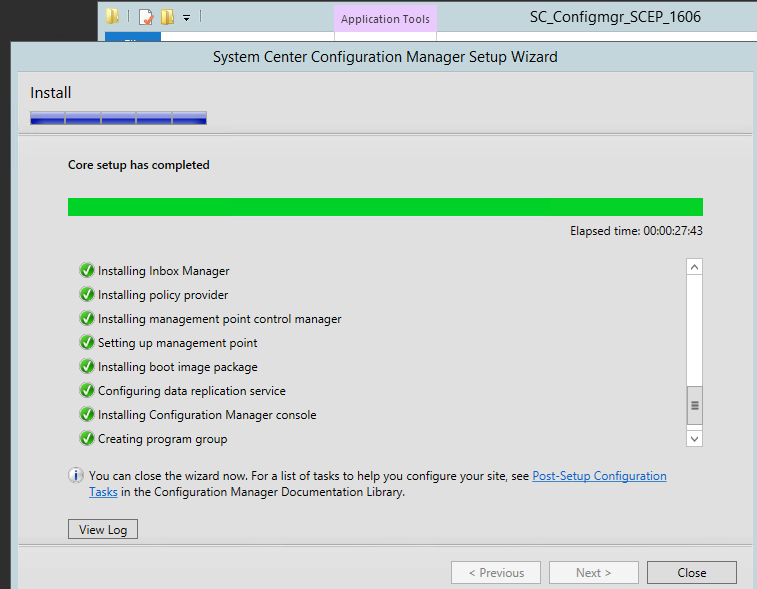
SCCM in my test lab

OK that's not a big deal for anyone but for me it was a three day long battle with lots of dead-ended installs, undo's and redo's. So, at long last this is the famous screen I wanted to see so much! All green! /me happy now, thanks Prajwal Desai


2016. szeptember 19., hétfő

Connect your Jira instance to a HipChat

Last year I got the chance to manage an Atlassian Jira and Confluence server. That was fun so far. But last week I was given a new task: fire up a HipChat instance and connect it with Jira. I wasted some days figuring out what to do with that exactly so to anyone getting here with Google: you are so lucky that I can tell you everything that you never find in any Atlassian docs. Here are the steps I have done.
1: download your HipChat  VM instance and import it to a Vmware host. (Change RAM, NIC etc. settings according your needs.)
2: Start, login with admin / hipchat into your console (to su, type: sudo /bin/dont-blame-hipchat)
3: Set your fix IP networking with such a command:  hipchat network -m static -i 192.168.100.20 -s 255.255.255.0 -g 192.168.100.254 -r 192.168.100.254
4: Open your /etc/hosts for edit and enter: 192.168.100.20 hipchat hipchat.mynetwork.local
5: In your nameserver set a new record for hipchat, e.g. hipchat.mynetwork.local (192.168.100.20)
6/a: generate a self signed SSL certificate
6/b: request a certificate from an external cert provider (see below *)
7: Finish your HC install using your (trial) licence and this certificate. (Certificate and hostname can be changed later)
8: Install HipChat connect Add-On in your Jira
9: Here comes the tricky part that drove me nuts. One can't simply force Jira connect to Hipchat because of Java engine in Jira won't trust HipChat's cert by default. You will notice that if you check catalina.out logfile in Jira: cat /opt/atlassian/jira/logs/catalina.out :
 /rest/hipchat/integration/latest/installation/complete [c.a.p.hipchat.rest.HipChatLinkResource] javax.net.ssl.SSLHandshakeException: sun.security.validator.ValidatorException: PKIX path building failed: sun.security.provider.certpath.SunCertPathBuilderException: unable to find valid certification path to requested target javax.net.ssl.SSLHandshakeException: sun.security.validator.ValidatorException: PKIX path building failed: sun.security.provider.certpath.SunCertPathBuilderException: unable to find valid certification path to requested target

So you have two choices.
First: manually add your cert to the trusted java store. Get your server public key, detailed here. Once got your pub key into a file, execute this command: (check your paths ofcoz')
/opt/atlassian/jira/jre/bin/keytool -import -alias hipchat.mighty.org -keystore /opt/atlassian/jira/jre/lib/security/cacerts -file /certs/mypubhipchat.crt
It asks you for a password. What the heck, what kind of password, you might ask! That is the default password for Java cert storage and hopefully nobody changed it in your system, so enter: changeit for password.

Second method: install SSL for Jira add-on. It's easier.

See attached srceenshot: it assists you installing the server cert. It creates an updated but temporary java keystore file and you have to copy it in place of the production keystore later and then restart the whole Jira.

10. Success ! (almost..)


* 7/b: in this case you'll need an external FQDN so have to own a domain name. So for example if you own mighty.org domain name, do the following:
- create a CSR for hipchat.mighty.org with your favorite linux home system.
- request a trusted certificate at a trusted 3rd party cert provider for hipchat.mighty.org
- in your INTERNAL(!) nameserver, create a new zone called hipchat.mighty.org and assing 192.168.100.20 to its @ value.


2016. július 26., kedd

Howto setup Icinga2 and Icingaweb on CentOS

On your newly installed CentOS server:
 
# this is my network setup for my own usage, won't fit yours :)
cat /etc/sysconfig/network-scripts/ifcfg-eth0
TYPE="Ethernet"
BOOTPROTO="static"
DEFROUTE="yes"
IPV4_FAILURE_FATAL="no"
NAME="eth0"
UUID="2ef9cace-1428-4dbf-aac7-7993463c359a"
DEVICE="eth0"
ONBOOT="yes"
IPADDR=192.168.183.235
NETMASK=255.255.254.0
NETWORKING=yes
HOSTNAME=s1
GATEWAY=192.168.183.254
NM_CONTROLLED=no 
yum -y install deltarpm
yum -y install wget net-tools bind-utils gcc mc
setenforce 0 # :( 
mcedit /etc/selinux/config
>> change enabled to SELINUX=disabled or SELINUX=permissive
yum -y update && yum -y upgrade
yum install -y epel-release
rpm --import http://packages.icinga.org/icinga.key
wget http://packages.icinga.org/epel/ICINGA-release.repo -O /etc/yum.repos.d/ICINGA-release.repo
yum makecache
yum install -y nagios-plugins-all icinga2 icinga2-ido-mysql icinga-idoutils-libdbi-mysql
yum install -y httpd php-cli php-pear php-xmlrpc php-xsl php-pdo php-soap php-gd php-ldap
mcedit /etc/php.ini
>> set date.timezone = Europe/YOURZONE
systemctl enable httpd && systemctl start httpd
yum install -y mariadb-server
systemctl start mariadb
systemctl enable mariadb
netstat -nlp | grep 3306 #(check if it runs)
mysql -u root
> use mysql;
> update user set password=PASSWORD("root_password") where User='root';
> flush privileges;
> exit
systemctl restart mariadb
mysql -u root -p
>CREATE DATABASE icinga2;
>GRANT SELECT, INSERT, UPDATE, DELETE, DROP, CREATE VIEW, INDEX, EXECUTE ON icinga2.* TO 'icinga2'@'localhost' IDENTIFIED BY 'icinga2_password';
>flush privileges;
>exit
mysql -u root -p icinga2 < /usr/share/icinga2-ido-mysql/schema/mysql.sql
mcedit /etc/icinga2/features-available/ido-mysql.conf
>> change:   user = "icinga2"
>>  password = "icinga2_password"
>>  host = "localhost"
>>  database = "icinga2"
systemctl enable icinga2 && systemctl start icinga2
tail -f /var/log/icinga2/icinga2.log #(check if it runs)
icinga2 feature enable command
icinga2 feature list # (to check)
systemctl restart icinga2
yum -y install icingaweb2 icingacli
grep icingaweb2 /etc/group #check if it's icingaweb2:x:990:apache
touch /var/www/html/index.html
chown apache /var/www/html/index.html
icingacli setup config directory --group icingaweb2
icingacli setup token create # get the token to the clipboard
icingacli setup token show # in case you missed it
systemctl restart httpd
# open a browser and type the IP address or FQDN of your server. That will be icinga.infokom.local for my case.
#next, next, you should see everything green


>authentication : database
>Database type: MySQL
>Host: localhost
>Database name: icingaweb2
>Username: myself
>Password: *********
>Character set: utf8
#rest of the web based setup detailed here with screenshots: 
#
#Now it's time to add your first node to your server.
#On the server, run: 
 
icinga2 node wizard
Welcome to the Icinga 2 Setup Wizard!

We'll guide you through all required configuration details.

Please specify if this is a satellite setup ('n' installs a master setup) [Y/n]: n
Starting the Master setup routine...
Please specifiy the common name (CN) [icinga.infokom.local]: Press Enter
Checking for existing certificates for common name 'icinga.infokom.local'...
Certificates not yet generated. Running 'api setup' now.
information/cli: Generating new CA.
information/base: Writing private key to '/var/lib/icinga2/ca/ca.key'.
information/base: Writing X509 certificate to '/var/lib/icinga2/ca/ca.crt'.
information/cli: Generating new CSR in '/etc/icinga2/pki/icinga.infokom.local.csr'.
information/base: Writing private key to '/etc/icinga2/pki/icinga.infokom.local.key'.
information/base: Writing certificate signing request to '/etc/icinga2/pki/icinga.infokom.local.csr'.
information/cli: Signing CSR with CA and writing certificate to '/etc/icinga2/pki/icinga.infokom.local.crt'.
information/cli: Copying CA certificate to '/etc/icinga2/pki/ca.crt'.
Generating master configuration for Icinga 2.
information/cli: Adding new ApiUser 'root' in '/etc/icinga2/conf.d/api-users.conf'.
information/cli: Enabling the 'api' feature.
Enabling feature api. Make sure to restart Icinga 2 for these changes to take effect.
information/cli: Dumping config items to file '/etc/icinga2/zones.conf'.
information/cli: Created backup file '/etc/icinga2/zones.conf.orig'.
Please specify the API bind host/port (optional):Press Enter
Bind Host []: Press Enter
Bind Port []: Press Enter
information/cli: Created backup file '/etc/icinga2/features-available/api.conf.orig'.
information/cli: Updating constants.conf.
information/cli: Created backup file '/etc/icinga2/constants.conf.orig'.
information/cli: Updating constants file '/etc/icinga2/constants.conf'.
Done.
 
# check the output if it's OK  
egrep 'NodeName|TicketSalt' /etc/icinga2/constants.conf 
mcedit /etc/icinga2/zones.conf 
# change the string NodeName to your FQDN, in my case:
cat /etc/icinga2/zones.conf
object Endpoint "icinga.infokom.local" {
}
object Zone ZoneName {
        endpoints = [ "icinga.infokom.local" ]
} 
systemctl restart icinga2.service
# to add my first client server named s2 i need a token 
icinga2 pki ticket --cn 's2.infokom.local'

# On the client server:
yum install -y epel-release
rpm --import http://packages.icinga.org/icinga.key
wget http://packages.icinga.org/epel/ICINGA-release.repo -O /etc/yum.repos.d/ICINGA-release.repo
yum makecache
yum install icinga2 mc
setenforce 0 # :( 
mcedit /etc/selinux/config
>> change enabled to SELINUX=disabled or SELINUX=permissive
icinga2 node wizard
Welcome to the Icinga 2 Setup Wizard!

We'll guide you through all required configuration details.

Please specify if this is a satellite setup ('n' installs a master setup) [Y/n]:Enter 
Starting the Node setup routine...
Please specifiy the common name (CN) [s2.infokom.local]: Enter
Please specifiy the local zone name [s2.infokom.local]: Enter
Please specify the master endpoint(s) this node should connect to:Enter
Master Common Name (CN from your master setup): icinga.infokom.local
Do you want to establish a connection to the master from this node? [Y/n]: y
Please fill out the master connection information:Enter
Master endpoint host (Your master's IP address or FQDN): 192.168.183.235
Master endpoint port [5665]: Enter
Add more master endpoints? [y/N]:  Enter
Please specify the master connection for CSR auto-signing (defaults to master endpoint host):Enter
Host [192.168.183.235]: Enter
Port [5665]: Enter
information/base: Writing private key to '/etc/icinga2/pki/s2.infokom.local.key'.
information/base: Writing X509 certificate to '/etc/icinga2/pki/s2.infokom.local.crt'.
information/cli: Generating self-signed certifiate:
information/cli: Fetching public certificate from master (192.168.183.235, 5665):

information/cli: Writing trusted certificate to file '/etc/icinga2/pki/trusted-master.crt'.
information/cli: Stored trusted master certificate in '/etc/icinga2/pki/trusted-master.crt'.

Please specify the request ticket generated on your Icinga 2 master.
 (Hint: # icinga2 pki ticket --cn 's2.infokom.local'): faaec3b98221622841cc437ee74b09a1f44b1ab
information/cli: Processing self-signed certificate request. Ticket 'faaec3b98221622841cc437ee74b09a1f44b1ab'.

information/cli: Created backup file '/etc/icinga2/pki/s2.infokom.local.crt.orig'.
information/cli: Writing signed certificate to file '/etc/icinga2/pki/s2.infokom.local.crt'.
information/cli: Writing CA certificate to file '/etc/icinga2/pki/ca.crt'.
Please specify the API bind host/port (optional):Enter
Bind Host []: Enter
Bind Port []: Enter
Accept config from master? [y/N]: y
Accept commands from master? [y/N]: y
information/cli: Disabling the Notification feature.
Disabling feature notification. Make sure to restart Icinga 2 for these changes to take effect.
information/cli: Enabling the Apilistener feature.
Enabling feature api. Make sure to restart Icinga 2 for these changes to take effect.
information/cli: Created backup file '/etc/icinga2/features-available/api.conf.orig'.
information/cli: Generating local zones.conf.
information/cli: Dumping config items to file '/etc/icinga2/zones.conf'.
information/cli: Created backup file '/etc/icinga2/zones.conf.orig'.
information/cli: Updating constants.conf.
information/cli: Created backup file '/etc/icinga2/constants.conf.orig'.
information/cli: Updating constants file '/etc/icinga2/constants.conf'.
Done. 

# to check
grep 's2' /etc/icinga2/constants.conf
mcedit /etc/icinga2/zones.conf 
# change NodeName to your local machine name, in my case it's FQDN
mcedit /etc/icinga2/zones.conf
object Endpoint "icinga.infokom.local" {
        host = "192.168.183.235"
        port = "5665"
}
object Zone "master" {
        endpoints = [ "icinga.infokom.local" ]
}
object Endpoint "s2.infokom.local" {
}
object Zone ZoneName {
        endpoints = [ "s2.infokom.local" ]
        parent = "master"
}

service icinga2 restart && service icinga2 enable
# wait a bit and back to the icinga server:
icinga2 node list 
# you SHOULD see your client server NOW
Node 's2.infokom.local' (last seen: Wed Jul 27 09:36:11 2016)
    * Host 's2.infokom.local'
        * Service 'apt'
[...]
 
icinga2 node update-config
systemctl reload icinga2.service 
Open your web GUI and see your new server, it's in PENDING state now. Wait a bit or click on CHECK NOW button in the 
CHECK EXECUTION section.
 

2016. június 27., hétfő

File access auditing on a Windows fileserver: Data Leakage Prevention

Here is a clever script concept that helps company managers notifying someone's unusual amount of file reading. That's typical behaviour for an employee who is intended to quit and try to steal all the files of that company. Such auditing softwares are on the market for several hundred or thousand bucks!
Luckily for you, I've written one in bash. OK that's not good news for ones who use only Windows. But it can be easily portable to any script language, for example, php so that it could be run directly in the Windows fileserver or DC by installing the proper runtime enviroment. (PHP, ruby, python, etc.)
Exploring that thought further, now I'm going to translate that for myself. ;) But for now, it's enough to get it work in bash.

The original idea is that we suppose that all the users open almost the same amount of files daily on their daily routines. This script always alerts when a statistical threshold percent reached per user.
In the following example you are going to see a nice solution for lab use in which I transfer the logfile from the Windows server to a Linux server to be able to run the bash script on it. You can find detailed comments inside the script.

Step-by-step installation:
1: Enable audit log policy on your Windows Server, assign it to the target folders and test it
(Note: in the above blog you can find an advanced example. In my case I look for event id 4663 because it just contains the information I need.) Set the audit rules according to your needs. The less eventrule the better. We need to trace file reads so the first rule is a must.


2: You need to export the specific events from the security log to a plain file. So create a getsec.ps1 file in c:\script\ with the following content:
Get-EventLog security -After (Get-Date).AddDays(-1) -InstanceId 4663 |select Message|ft -AutoSize -Wrap > c:\auditing\report.txt
3: Also, don't forget to create that c:\auditing folder and then put an empty file into it named: mounted

 4: Schedule the script to run at the end of the working hours or at midnight. The command is to be: (e.g.) C:\Windows\System32\WindowsPowerShell\v1.0\powershell.exe and the argument (e.g.): -executionpolicy bypass -file c:\scripts\getsec.ps1  2>&1 > C:\scripts\log.txt
5: Share c:\auditing folder with a dedicated user that is intended to be used only by the Linux server, e.g.: linuxsrv
6: On your linux box, install the following packages: cifs-utils dos2unix mutt iconv
7: Test your connection:
 [ -f /mnt/mounted ] || mount.cifs //192.168.xx.xx/auditing/ /mnt/ -o username=linuxsrv,password=Sup3rS3cur3P4$$,domain=contoso
8: Create the base directories in, e.g.
mkdir /root/auditor && cd /root/auditor
mkdir archive average stat users; echo "0" > counter

Having succeeded, congratulations, now you are ready to track your file access activity and watch out for possible data stealing FOR FREE!


Here is the mighty script. See comments inline!

2016. június 21., kedd

More Powershell

The original idea was to ease the process of creating a new distribution group with one human member and an archive public folder regularly. These mail enabled security groups and public folders always get their names based on a company standard: Contoso GROUPNAME and Contoso_Groupname_Archive. The most exciting part of it is the waiting loop: we've got to make sure the the new group is created and replicated over the DCs in the domain before going on. Have to be run in an Exchange Shell.
Two minor notes: pfviewer is a special company group in which all the viewer right assigned users are. Jane.manager1 and john.manager2 are the company head managers.

Import-Module activedirectory
$ShName = Read-Host "Please specify the new groupname, e.g.: TechGroup1"
$Name = "Contoso "+$ShName
if (!(dsquery group -samid $Name)){ NEW-ADGroup -name $Name -groupscope 2 -path "OU=ContMailLists,DC=co,DC=local" }else{Write-Host "WARNING: ADGroup already exists. PRESS CTRL+C to exit or take the consequences."}
$DotName ="contoso."+$ShName
$EmailADD = $DotName+"@contoso.com"
$PFName = "Contoso_"+$ShName+"_Archiv"
$Ember = Read-Host "Specify the login name of the user going to be a member of this group. E.g.: john.smith"
$FullPFName = "\"+$PFName
$PFEmail = "contoso"+$ShName+"Archiv@contoso.com"
$IfGroupExists = Get-DistributionGroup -name $Name -ErrorAction 'SilentlyContinue'
  if( $
IfGroupExists)
      {
      $IFSTOP = Read-Host "This distribution group already exists! Press CTRL+C-t to exit"
   }
Write-Host -NoNewline "Please wait a bit. Shouldn't take long"
    Do
    {
        If($Idx -gt 0) {Start-sleep -s 2}
        $r = Get-ADGroup -Filter {SamAccountName -eq $Name}
        Write-Host -NoNewline "."
        $Idx = $Idx + 1
    }
    Until($r)

Enable-DistributionGroup -Identity "CN=$Name,OU=ContMailLists,DC=wt,DC=local" -Alias $DotName
Set-DistributionGroup -Identity $Name -ManagedBy co.local\Admin -BypassSecurityGroupManagerCheck
Set-DistributionGroup -Identity $Name -RequireSenderAuthenticationEnabled 0 -PrimarySmtpAddress $EmailADD -WindowsEmailAddress $EmailADD -EmailAddressPolicyEnabled 0 -Alias $DotName -GrantSendOnBehalfTo jane.manager1, john.manager2, $Ember
New-PublicFolder -Name $PFName -Path \
Enable-MailPublicFolder -Identity $FullPFName -HiddenFromAddresslistsEnabled 1
Set-MailPublicFolder -Identity $FullPFName -EmailAddressPolicyEnabled 0
Set-MailPublicFolder -Identity $FullPFName -EmailAddresses $PFEmail
Add-PublicFolderClientPermission -Identity $FullPFName -accessrights ReadItems,CreateItems,FolderVisible -user pfviewer
Remove-PublicFolderClientPermission -Identity $FullPFName -accessrights ReadItems,EditOwnedItems,DeleteOwnedItems,FolderVisible -user default -Confirm:$false
Add-DistributionGroupMember -Identity $Name -member $PFName
Add-DistributionGroupMember -Identity $Name -member $Ember

2016. május 31., kedd

Docker minihowto

To start a new container. If does not exists locally, it downloads a stock one from dockerhub.
docker run -i -t centos:latest /bin/bash
(-i: interactive mode) (-t: runs centos image) (starts a command, here a shell)
List running docker containers: docker ps
List running docker containers + history : docker ps -a
List docker local images: docker images
Escape from a container and put that running one in the background: CTRL-P+CTRL-Q - or run it with -exec: docker exec -ti [CONTAINER-ID] bash
It starts a new process with bash shell, and you could escape from it by ^c directly, it won't affect the original process.

On the host find the docker virtual files (aufs), confs, etc. here: /var/lib/docker
See details about an image: docker inspect IMAGENAME(e.g. centos:latest)OR ITS_RANDOM_NAME | less
To build a new container: docker build -t MYIMAGENAME . (.=where my DOCKERFILE is)

an example DOCKERFILE content looks like:

FROM ubuntu:latest
RUN apt-get update
RUN apt-get install -y wget
RUN apt-get install -y build-essential tcl8.5
RUN wget http://download.redis.io/releases/redis-stable.tar.gz
RUN tar xzf redis-stable.tar.gz
RUN cd redis-stable && make && make install
RUN ./redis-stable/utils/install_server.sh
EXPOSE 6379
ENTRYPOINT  ["redis-server"]
 
To see the standard output of a container: docker logs CONTAINERNAME
docker run -d centos:latest -p 3000:3000 --name my-service
(starts in the background) (maps hosts's port 3000 (on all interfaces) to container's service port 3000)
To enter inside a container with bash:  docker exec -i -t my-service /bin/bash
Tag (set an alias name for) an image: docker tag IMAGE_ID (seen in the output of docker images) REPONAME:TAG (e.g. mydockeruser/myrepo:2)
Now see what you have tagged: docker images
Enter dockerhub with your dockerhub login: docker login
Push your new built image into your pub repository: docker push REPONAME:TAG
Remove an image from localhost repository: docker rmi IMAGE_ID (force with -f)
For example, to start a new mariadb instance:
docker run --name mariadb-1 -p 3306:3306 -e MYSQL_ROOT_PASSWORD=mypass -v /home/ubuntu/db/db1:/var/lib/mysql -d mariadb
(with -v you mount your localhost's folder into your container)(with -e you pass an environment variable to the container.
Passing a global variable, for example: docker run -i -t -e "WHOISTHEKING=me" ubuntu:14.04 /bin/bash -> echo $WHOISTHEKING)

Insert a file into the container directly from outside:
docker insert CONTAINERNAME http://ftp.drupal.org/files/projects/drupal-7.22.tar.gz /root/drupal.tar.gz
To commit your changes to the image: docker commit -m "commit message" -a "Your Name" IMAGENAME username/my-redis:latest TO BE CONTINUED

2016. május 19., csütörtök

GlusterFS in a simple way

Here is the story how I managed to install a 2 node glusterfs on CentOS and one client for test purposes.
In my case the hostnames and the IPs were:

192.168.183.235 s1
192.168.183.236 s2
192.168.183.237 c1

Append these to the end of /etc/hosts to make sure that simple name resolution will work.
Execute the followings on both servers.

rpm -ivh  http://dl.fedoraproject.org/pub/epel/7/x86_64/e/epel-release-7-5.noarch.rpm 
wget  -P /etc/yum.repos.d http://download.gluster.org/pub/gluster/glusterfs/3.7/3.7.5/CentOS/glusterfs-epel.repo 
yum -y install glusterfs glusterfs-fuse glusterfs-server

It's no need to install any of samba packages if you don't intend to use smb.

systemctl enable glusterd.service
Created symlink from /etc/systemd/system/multi-user.target.wants/glusterd.service to /usr/lib/systemd/system/glusterd.service.

Both servers had a second 20G capacity disk named sdb. I created two LV's for two bricks.

[root@s2 ~]# lvcreate -L 9G -n brick2 glustervg
 Logical volume "brick2" created.
[root@s2 ~]# lvcreate -L 9G -n brick1 glustervg
 Logical volume "brick1" created.
[root@s1 ~]# vgcreate glustervg /dev/sdb
 Volume group "glustervg" successfully created
[root@s1 ~]# lvcreate -L 9G -n brick2 glustervg
 Logical volume "brick2" created.
[root@s1 ~]# lvcreate -L 9G -n brick1 glustervg
 Logical volume "brick1" created.
[root@s2 ~]# pvdisplay

  --- Physical volume ---
  PV Name               /dev/sdb
  VG Name               glustervg
  PV Size               20.00 GiB / not usable 4.00 MiB
  Allocatable           yes
  PE Size               4.00 MiB
  Total PE              5119
  Free PE               511
  Allocated PE          4608
  PV UUID               filZyX-wR7W-luFX-Asyn-fYA3-f7tf-q4xGyU
[...]

[root@s2 ~]# lvdisplay

  --- Logical volume ---
  LV Path                /dev/glustervg/brick2
  LV Name                brick2
  VG Name                glustervg
  LV UUID                Rx3FPi-S3ps-x3Z0-FZrU-a2tq-IxS0-4gD2YQ
  LV Write Access        read/write
  LV Creation host, time s2, 2016-05-18 16:02:41 +0200
  LV Status              available
  # open                 0
  LV Size                9.00 GiB
  Current LE             2304
  Segments               1
  Allocation             inherit
  Read ahead sectors     auto
  - currently set to     8192
  Block device           253:3

  --- Logical volume ---
  LV Path                /dev/glustervg/brick1
  LV Name                brick1
  VG Name                glustervg
  LV UUID                P5slcZ-dC7R-iFWv-e0pY-rvyb-YrPm-FM7YuP
  LV Write Access        read/write
  LV Creation host, time s2, 2016-05-18 16:02:43 +0200
  LV Status              available
  # open                 0
  LV Size                9.00 GiB
  Current LE             2304
  Segments               1
  Allocation             inherit
  Read ahead sectors     auto
  - currently set to     8192
  Block device           253:4
[...]


[root@s1 ~]# lvdisplay
  --- Logical volume ---
  LV Path                /dev/glustervg/brick2
  LV Name                brick2
  VG Name                glustervg
  LV UUID                7yC2Wl-0lCJ-b7WZ-rgy4-4BMl-mT0I-CUtiM2
  LV Write Access        read/write
  LV Creation host, time s1, 2016-05-18 16:01:56 +0200
  LV Status              available
  # open                 0
  LV Size                9.00 GiB
  Current LE             2304
  Segments               1
  Allocation             inherit
  Read ahead sectors     auto
  - currently set to     8192
  Block device           253:2

  --- Logical volume ---
  LV Path                /dev/glustervg/brick1
  LV Name                brick1
  VG Name                glustervg
  LV UUID                X6fzwM-qdRi-BNKH-63fa-q2O9-jvNw-u2geA2
  LV Write Access        read/write
  LV Creation host, time s1, 2016-05-18 16:02:05 +0200
  LV Status              available
  # open                 0
  LV Size                9.00 GiB
  Current LE             2304
  Segments               1
  Allocation             inherit
  Read ahead sectors     auto
  - currently set to     8192
  Block device           253:3
[...]
 

[root@s1 ~]# mkfs.xfs /dev/glustervg/brick1
 

meta-data=/dev/glustervg/brick1  isize=256    agcount=4, agsize=589824 blks
         =                       sectsz=4096  attr=2, projid32bit=1
         =                       crc=0        finobt=0
data     =                       bsize=4096   blocks=2359296, imaxpct=25
         =                       sunit=0      swidth=0 blks
naming   =version 2              bsize=4096   ascii-ci=0 ftype=0
log      =internal log           bsize=4096   blocks=2560, version=2
         =                       sectsz=4096  sunit=1 blks, lazy-count=1
realtime =none                   extsz=4096   blocks=0, rtextents=0


[root@s1 ~]# mkfs.xfs /dev/glustervg/brick2

meta-data=/dev/glustervg/brick2  isize=256    agcount=4, agsize=589824 blks
         =                       sectsz=4096  attr=2, projid32bit=1
         =                       crc=0        finobt=0
data     =                       bsize=4096   blocks=2359296, imaxpct=25
         =                       sunit=0      swidth=0 blks
naming   =version 2              bsize=4096   ascii-ci=0 ftype=0
log      =internal log           bsize=4096   blocks=2560, version=2
         =                       sectsz=4096  sunit=1 blks, lazy-count=1
realtime =none                   extsz=4096   blocks=0, rtextents=0


[root@s1 ~]# mkdir -p /gluster/brick{1,2}
[root@s2 ~]# mkdir -p /gluster/brick{1,2}
[root@s1 ~]# mount /dev/glustervg/brick1 /gluster/brick1 && mount /dev/glustervg/brick2 /gluster/brick2
[root@s2 ~]# mount /dev/glustervg/brick1 /gluster/brick1 && mount /dev/glustervg/brick2 /gluster/brick2


Add the following to a newline in both /etc/fstab:


/dev/mapper/glustervg-brick1 /gluster/brick1 xfs rw,relatime,seclabel,attr2,inode64,noquota 0 0
/dev/mapper/glustervg-brick2 /gluster/brick2 xfs rw,relatime,seclabel,attr2,inode64,noquota 0 0


[root@s1 etc]# systemctl start glusterd.service

Making sure:
[root@s1 etc]# ps ax|grep gluster

 1010 ?        Ssl    0:00 /usr/sbin/glusterd -p /var/run/glusterd.pid --log-level INFO[root@s1 etc]# gluster peer probe s2
peer probe: success.


[root@s2 etc]# gluster peer status
Number of Peers: 1
Hostname: 192.168.183.235
Uuid: f5bdc3f3-0b43-4a83-86c1-c174594566b9
State: Peer in Cluster (Connected)


[root@s1 etc]# gluster pool list
UUID                                    Hostname        State
01cf8a70-d00f-487f-875e-9e38d4529b57    s2              Connected
f5bdc3f3-0b43-4a83-86c1-c174594566b9    localhost       Connected

[root@s1 etc]# gluster volume status
No volumes present

[root@s2 etc]# gluster volume info
No volumes present

[root@s1 etc]# mkdir /gluster/brick1/mpoint1
[root@s2 etc]# mkdir /gluster/brick1/mpoint1
[root@s1 gluster]# gluster volume create myvol1 replica 2 transport tcp s1:/gluster/brick1/mpoint1 s2:/gluster/brick1/mpoint1

volume create: myvol1: failed: Staging failed on s2. Error: Host s1 is not in 'Peer in Cluster' state

Ooooops....
[root@s2 glusterfs]# ping s1ping: unknown host s1I forgot to check name resolution. When i fixed this and tried to create it again, i got:
[root@s1 glusterfs]# gluster volume create myvol1 replica 2 transport tcp s1:/gluster/brick1/mpoint1 s2:/gluster/brick1/mpoint1
volume create: myvol1: failed: /gluster/brick1/mpoint1 is already part of a volume
 
 WTF ??
[root@s1 glusterfs]# gluster volume get myvol1 all
volume get option: failed: Volume myvol1 does not exist
[root@s1 glusterfs]# gluster
gluster>
exit         global       help         nfs-ganesha  peer         pool         quit         snapshot     system::     volume
gluster> volume
add-brick      bitrot         delete         heal           inode-quota    profile        remove-brick   set            status         tier
attach-tier    clear-locks    detach-tier    help           list           quota          replace-brick  start          stop           top
barrier        create         get            info           log            rebalance      reset          statedump      sync

gluster> volume l
list  log
gluster> volume list
No volumes present in cluster

That's odd! Hmm. I thought it'd work: 
[root@s1 /]# rm /gluster/brick1/mpoint1
[root@s1 /]# gluster volume create myvol1 replica 2 transport tcp s1:/gluster/brick1/mpoint1 s2:/gluster/brick1/mpoint1volume create: myvol1: success: please start the volume to access data

[root@s1 /]# gluster volume list

myvol1

Yep. Success. Phuhh.
[root@s1 /]# gluster volume start myvol1
volume start: myvol1: success

[root@s2 etc]# gluster volume list

myvol1
[root@s2 etc]# gluster volume status
Status of volume: myvol1
Gluster process                             TCP Port  RDMA Port  Online  Pid
------------------------------------------------------------------------------
Brick s1:/gluster/brick1/mpoint1            49152     0          Y       2528
Brick s2:/gluster/brick1/mpoint1            49152     0          Y       10033
NFS Server on localhost                     2049      0          Y       10054
Self-heal Daemon on localhost               N/A       N/A        Y       10061
NFS Server on 192.168.183.235               2049      0          Y       2550
Self-heal Daemon on 192.168.183.235         N/A       N/A        Y       2555

Task Status of Volume myvol1
------------------------------------------------------------------------------
There are no active volume tasks

[root@s1 ~]# gluster volume create myvol2 s1:/gluster/brick2/mpoint2 s2:/gluster/brick2/mpoint2  force
volume create: myvol2: success: please start the volume to access data
[root@s1 ~]# gluster volume start myvol2
volume start: myvol2: success
[root@s1 ~]# gluster volume info
Volume Name: myvol1
Type: Replicate
Volume ID: 633b765b-c630-4007-91ca-dc42714bead4
Status: Started
Number of Bricks: 1 x 2 = 2
Transport-type: tcp
Bricks:
Brick1: s1:/gluster/brick1/mpoint1
Brick2: s2:/gluster/brick1/mpoint1
Options Reconfigured:
performance.readdir-ahead: on

Volume Name: myvol2
Type: Distribute
Volume ID: ebfa9134-0e6a-40be-8045-5b16436b88ed
Status: Started
Number of Bricks: 2
Transport-type: tcp
Bricks:
Brick1: s1:/gluster/brick2/mpoint2
Brick2: s2:/gluster/brick2/mpoint2
Options Reconfigured:
performance.readdir-ahead: on

On the client:

[root@c1 ~]# wget -P /etc/yum.repos.d http://download.gluster.org/pub/gluster/glusterfs/LATEST/CentOS/glusterfs-epel.repo
[...]
[root@c1 ~]# yum -y install glusterfs glusterfs-fuse
[....]
[root@c1 ~]# mkdir  /g{1,2}
[root@c1 ~]# mount.glusterfs s1:/myvol1 /g1
[root@c1 ~]# mount.glusterfs s1:/myvol2 /g2
[root@c1 ~]# mount
[...]
s1:/myvol1 on /g1 type fuse.glusterfs (rw,relatime,user_id=0,group_id=0,default_permissions,allow_other,max_read=131072)
s2:/myvol2 on /g2 type fuse.glusterfs (rw,relatime,user_id=0,group_id=0,default_permissions,allow_other,max_read=131072)
[root@c1 ]# df -h
Filesystem               Size  Used Avail Use% Mounted on
/dev/mapper/centos-root   28G  1.1G   27G   4% /
devtmpfs                 422M     0  422M   0% /dev
tmpfs                    431M     0  431M   0% /dev/shm
tmpfs                    431M  5.7M  426M   2% /run
tmpfs                    431M     0  431M   0% /sys/fs/cgroup
/dev/sda1                494M  164M  331M  34% /boot
tmpfs                     87M     0   87M   0% /run/user/0
s1:/myvol1               9.0G   34M  9.0G   1% /g1 [9G,9G because of replicating (aka RAID1 over network))
s2:/myvol2                18G   66M   18G   1% /g2 (9G+9G because of distributing (aka JBOD over network))

What is the difference between distributing and striping? Here are two short sniplets from glusterhacker blog:
Distribute : A distribute volume is one, in which all the data of the volume, is distributed throughout the bricks. Based on an algorithm, that takes into account the size available in each brick, the data will be stored in any one of the available bricks. [...] The default volume type is distribute, hence my myvol2 got distributed.
Stripe: A stripe volume is one, in which the data being stored in the backend is striped into units of a particular size, among the bricks. The default unit size is 128KB, but it's configurable. If we create a striped volume of stripe count 3, and then create a 300 KB file at the mount point, the first 128KB will be stored in the first sub-volume(brick in our case), the next 128KB in the second, and the remaining 56KB in the third. The number of bricks should be a multiple of the stripe count.

The very useable official howto is here.
   
Performance test, split brain, to be continued....