A következő címkéjű bejegyzések mutatása: iptables. Összes bejegyzés megjelenítése

2016. március 9., szerda

Ubiquiti Unify nuisances and the attack of the Martians

Some weeks ago I was given a nice task. A client of ours wants us to set up two new Unify APs in its network with two new wireless networks: one for guest and one for internal use. They had a Vigor 2925 to be used for firewall and DHCP role. For those who are not familiar with the wireless products named ubiquiti unify APs, here are a few links to inform:
How do I configure a "Guest Network" on UniFi AP?
Instructive reading. Based on the infos here I finally decided not to use the internal "firewall" in the APs and let the Vigor do the network separation.
UniFi - Does the controller need to be running at all times?
Official answer says "no, most of the times it is not necessary." Unfortunately this isn't entirely true with the latest firmwares. :/
No worries, since the client already had a Linux server, it looked so simple to install the controler software and setup the nodes. Sadly, everything went a different way.
For a mystical reason I couldn't make the controller software, running on the Linux, see its APs, even they were in the same subnet by their IPs and in the same broadcast domain, for the sake of Layer2 communications. I spent two days just on this riddle. Maybe it was a misconfiguration of the D-Link switches or maybe an insolvable incompatibility issue. I don't know why to this very day. :( I tried everything but the time run out so I had to find a quick solution.
So I decided to use a different network card and a second subnet on the Linux only to control the APs.
I ended up with this config:
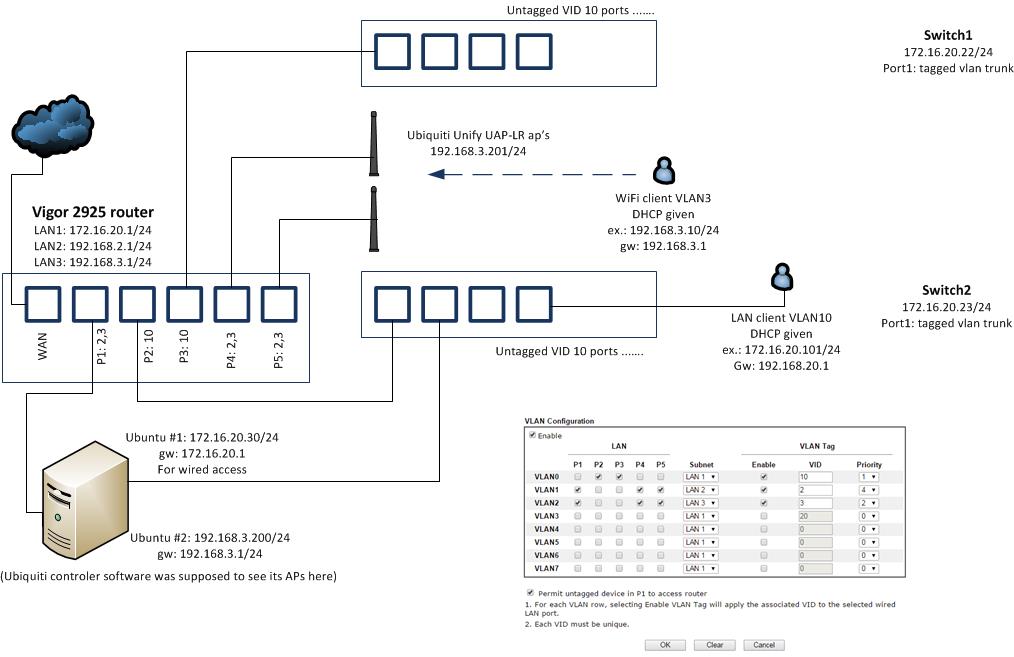
My interfaces were:
em1       Link encap:Ethernet  HWaddr 00:25:90:xx:xx:xx
          inet addr:172.16.20.30  Bcast:172.16.20.255  Mask:255.255.255.0
          inet6 addr: fe80::225:90ff:fed3:930c/64 Scope:Link
..
em2       Link encap:Ethernet  HWaddr 00:25:90:xx:xx:xx
          inet addr:192.168.3.200  Bcast:192.168.3.255  Mask:255.255.255.0
          inet6 addr: fe80::225:90ff:fed3:930d/64 Scope:Link
..
lo        Link encap:Local Loopback
          inet addr:127.0.0.1  Mask:255.0.0.0
..

APs looked working. I think Connected(limited) state is normal in this case. Note that I didn't use the built-in "guest network" feature because it's just ridiculous.


 So everything seemed properly set. But to my greatest astonishment I coudn't reach network share of my server lying on 172.16.20.30 from my internal wifi client 192.168.3.11. When I started to ping and tcpdump'ed on the server I saw that echo requests came in but replies never went back. I thought to myself: Seeing the fact that the kernel wanted to reply on the other interface (192.168.3.x) it's hardly surprising that it didn't work.
So I set IP policy routing: if the packet comes from 192.168.3.11 on em1, reply to it on the same interface -em1- instead of em2. You know, all the iptables mangle MARK and ip route add default via 172.16.20.1 dev em1 table ... stuff, etc. etc. etc.
It didn't work either. Suddenly a light dawned on me. I turned on kernel martian packet logging with echo 1 > /proc/sys/net/ipv4/conf/all/log_martians
and VOILA I saw:

Mar  2 20:08:03 superserver kernel: [ 2755.407570] IPv4: martian source 192.168.3.11 from 192.168.3.200, on dev em1
Mar  2 20:08:03 superserver kernel: [ 2755.407590] ll header: 00000000: ff ff ff ff ff ff 00 25 90 d3 93 0d 08 06        .......%......
Mar  2 20:08:04 superserver kernel: [ 2756.424025] IPv4: martian source 192.168.3.11 from 192.168.3.200, on dev em1
Mar  2 20:08:04 superserver kernel: [ 2756.424048] ll header: 00000000: ff ff ff ff ff ff 00 25 90 d3 93 0d 08 06        .......%......
Mar  2 20:08:05 superserver kernel: [ 2757.421639] IPv4: martian source 192.168.3.11 from 192.168.3.200, on dev em1
Mar  2 20:08:05 superserver kernel: [ 2757.421661] ll header: 00000000: ff ff ff ff ff ff 00 25 90 d3 93 0d 08 06        .......%......

It's a bit confusing isn't it ?!?! 192.168.3.200 is my own server!
I tried to turn off the Martian protection with echo 0 > /proc/sys/net/ipv4/conf/all/rp_filter
but I learned: such a bad routing problem can not be solved with a simple fix like this.
I was thinking very hard for an hour and finally I faked the kernel with an another subnet set on my second interface:

auto em2
iface em2 inet static
    address 192.168.3.200
    netmask 255.255.255.192


Now it's working as expected:
root@:/# route -n
Kernel IP routing table
Destination     Gateway         Genmask         Flags Metric Ref    Use Iface
0.0.0.0         172.16.20.1     0.0.0.0         UG    0      0        0 em1
172.16.20.0     0.0.0.0         255.255.255.0   U     0      0        0 em1
192.168.3.192   0.0.0.0         255.255.255.192 U     0      0        0 em2

These were all done on a:
Linux 3.11.0-12-generic #19-Ubuntu SMP Wed Oct 9 16:20:46 UTC 2013 x86_64 x86_64 x86_64 GNU/Linux

2015. július 15., szerda

Living with IPFire (bye-bye pfSense)

In the first part of this article I discussed some interesting facts about pfsense. I, again, strongly recommend not to use pfSense 2.2.* in production environments because it is a totally unreliable and buggy system. Okay but what to use then ?
For instance, one can choose IPFire. Yep, I did. It's rock solid, lightning fast and easy to use system. Everything that can't be told about pfSense. I like it.
Except for one minor thing... And that thing is, sadly, not that minor.
For anyone who is familiar with standard iptables chains and logic (I mean input/output/forward/etc) it's very confusing the way pfsense and IPFire virtually handles the traffic.
IPFire consists lots of built-in chains that can be troublesome at the first glance. But you will never get to know about those ones if you use only the GUI based rules editor. I've spent 3 days, frankly, on creating some very basic allow and deny rule on the red0 interface, without any success. That totally screwed me up. You can just never be sure where (I mean, which chain) your web edited rules will be put in. E.g. below shown rules are all faulty, God knows why.
Playing with basic IPFire rules

So I ended up with editing the /etc/sysconfig/firewall.local file and tadaaam, that worked. If you are an expert on iptables, forget your firewall fancy GUI editor forever.

case "$1" in
  start)
        iptables -A CUSTOMINPUT -d 255.255.255.255 -p udp --dport 7437 -j DROP
        iptables -A CUSTOMINPUT -i red0 ! -s 192.168.1.1 -p udp -j DROP
        ;;
  stop)
        iptables -D CUSTOMINPUT -d 255.255.255.255 -p udp --dport 7437 -j DROP
        iptables -D CUSTOMINPUT -i red0 ! -s 192.168.1.1 -p udp -j DROP
        ;;


Just a small side note: reloading the rules with the GUI also reloads your .local defined rules.

2014. november 17., hétfő

IPTABLES - how to allow or deny certain countries of the world

It's a usual request for a sysadmin to ban or allow only a certain country in firewalls or .htaccesses of apache. Here are two common ways to do that.

Method 1.
Using xtables and maxmind

apt-get install libtext-csv-xs-perl module-assistant geoip-database libgeoip1
module-assistant --verbose --text-mode auto-install xtables-addons
mkdir /usr/share/xt_geoip
cd /usr/share/xt_geoip
# this is a rather old package but for free
wget http://terminal28.com/wp-content/uploads/2013/10/geoip-dl-build.tar.gz
tar xvf geoip-dl-build.tar.gz
./xt_geoip_dl
./xt_geoip_build -D . *.csv
##EXAMPLE ##EXAMPLE ##EXAMPLE ##EXAMPLE ##EXAMPLE ##EXAMPLE ##EXAMPLE 
iptables --flush # BEWARE
iptables -A INPUT -p tcp --dport 443 -m geoip --src-cc HU,CZ,PL,RO -j ACCEPT
iptables -A INPUT -p tcp --dport 443 -j DROP


Method 2.
Simply using https://www.countryipblocks.net/country_selection.php to get ranges to allow/deny


2013. július 19., péntek

IPSET for heavy use

What is ipset?
According to the official page: "IP sets are a framework inside the Linux 2.4.x and 2.6.x kernel, which can be administered by the ipset utility. Depending on the type, currently an IP set may store IP addresses, (TCP/UDP) port numbers or IP addresses with MAC addresses in a way, which ensures lightning speed when matching an entry against a set."
It's worth mentioning that this cool tool is mainly written by Jozsef Kadlecsik, a Hungarian Linux kernel expert.

Why and when to use ipset?
If you have plenty of IP rules in your iptables and their number is growing, one day you are going to experience a heavy performance drop. In practice if you have more than ca. ~1000-1500 rules you should worry about this. Anyway, it's more neater to use ipset above dozens of sets.

How does it work? 
You don't have to know and don't want to know. It's enough to know that it generates hashes from the rules and flipping thru these hashes is so efficient that it doesn't matter how many rules you have, the fastness of searching the whole set remains almost the same.

How to use?


For beginners

Assuming you have a modern .deb based distro, here are some simple steps.
apt-get update
apt-get install ipset

ipset create SET1 hash:net (for example)

ipset add SET1 91.83.231.25 (for example)
ipset add SET1 80.249.172.0/24 (for example)
iptables -I INPUT -m set --match-set SET1 src -j DROP (to drop all matching packets)
To save all your sets:
ipset save > backupfile
To delete:
ipset del SET1 91.83.231.25 - deletes a single line from a set
ipset flush SET1 - deletes a whole set
ipset destroy - deletes all the sets
BEFORE deleting a set you should delete the links in your iptables pointing to your set, e.g.
iptables -D INPUT -m set --match-set SET1 src -j DROP
To see your sets in different ways:
ipset -n list
ipset -t list
ipset list

To check if an IP address exists in a set:
ipset test 10.10.10.10

To restore your sets (assuming that sets in the file don't exist already)
ipset restore < mybackupfile

Some tricks

To create a new ruleset being the type of hash (thats the type because you want ipset, more info here), append some addresses to it and deny them based on the source IP address.
ipset -N set2 hash
ipset -A set2 10.10.10.0/24
ipset -A set2 80.249.172.62
iptables -A INPUT -m set --myset set2 src -j DROP
To fast delete a rule (don't forget to delete the relevant iptables rule before)
ipset -F set2
ipset -X set2 
or simply:
ipset f  
ipset x
To auto-deny a host that wants to connect to your SSH port is so simple that:
ipset -N denied hash
iptables -A INPUT -p tcp --dport 22 -j SET --add-set
denied src
iptables -A INPUT -m set --set
denied src -j DROP

To block IP addresses based on geo location (country) here is a simple shellscript:
#!/bin/sh
ipset -N geoblock nethash
for IP in $(wget -O – http://www.ipdeny.com/ipblocks/data/countries/{cn,kr,pk,tw,sg,hk,pe}.zone)
do
ipset -A geoblock $IP
done

iptables -A INPUT -m set –set geoblock src -j DROP

To auto-timeout a rule (and not generate any message if it already exists):
ipset create test hash:ip timeout 10
ipset add --exists test 91.83.231.25 120 (overwriting the default 10 seconds value)

To auto-learn a MAC address: (and define a range)
ipset create test bitmap:ip,mac range 192.168.0.0/24
ipset add test 192.168.0.1,11:11:22:22:11:11
ipset add test 192.168.0.2 (this one will auto-learn)

More advanced WAN/LAN/DMZ firewall example

We define our client (source) IPs and ports they want to communicate to. We define our server IP address and ports. We allow established tcp sessions. Here, things are getting interesting.
We allow all packets coming in my external (internet) interface heading towards to my dmz server ip address and ports. (see dst,dst. That means destination IP AND destination port. (Here HTTP and HTTPS and udp only DNS and ping [it will reply the echo].)
Then we allow our LAN clients to access the internet web based on src,dst. (source IP address and destination port). In our case, anyone in the LAN can browse the web but only 192.168.0.10 can use https.
In the last line we allow our trusted administrator to connect to tcp ports 22020 to 22022 anywhere in our system.

ipset n dmzservers hash:ip,port
ipset n mynetworks hash:ip,iface
ipset n lanusers hash:ip,port
ipset n remoteadmin hash:ip,port
ipset a dmzservers 195.195.195.195,http
ipset a dmzservers 195.195.195.195,https
ipset a dmzservers 195.195.195.195,udp:53
ipset a dmzservers 195.195.195.195,icmp:ping 
ipset a mynetworks 192.168.0.0/24,eth0
ipset a mynetworks 8.8.8.0/24,eth1
ipset a mynetworks 195.195.195.193/30,eth2 (these network definitions are not used)
ipset a lanusers 192.168.0.0/24,http
ipset a lanusers 192.168.0.10,https
ipset a remoteadmin 82.112.112.112,tcp:22020-22022
iptables -A FORWARD -m state --state ESTABLISHED,RELATED -j ACCEPT

iptables -A FORWARD -i $EXTERNAL -m set --match-set dmzservers dst,dst -m state --state NEW -j ACCEPT 
iptables -A FORWARD -i $INTERNAL -m set --match-set lanusers src,dst -m state --state NEW -j ACCEPT
iptables -A FORWARD -i $EXTERNAL -m set --match-set remoteadmin src,dst -m state --state NEW -j ACCEPT

2013. február 15., péntek

Policy routing script doesn't work on Ubuntu

We've recently switched a gateway server from Debian to Ubuntu and to my greatest surprise, my little neat policy routing doesn't work on it.
The issue is almost the same as detailed here
http://unix.stackexchange.com/questions/58635/iptables-set-mark-route-diferent-ports-through-different-interfaces
I've found an interesting comment:
Remember that Ubuntu enables reverse path filtering by default. Reverse path filtering works as follow: When the kernel receives a packet (may it be forwarded or not) from an interface A, it will invert the source address and the destination address, and check if the resulting packet should be routed through interface A. If it isn't, the packet is dropped as a address spoofing attempt. For packets received from eth0, this is not a problem. For packets received from eth1, this is also not a problem, because when reversing the source ip address and the destination ip address, the kernel will it the default route in table main. For packets received from eth2, which you do not mark, this is a problem, because the kernel will hit the default route in table main, and consider that these packets should have been received from eth1.

Wow, that would be the cause of the problem. So I added to my existing...

PPP0GW=`ifconfig | grep -A1 ppp0 | tail -1 | cut -d : -f3 | cut -d ' ' -f1`
ip ru add fwmark 2 table adsl
#ip route flush table adsl
ip route add table adsl $PPP0GW dev ppp0 src 188.6.X.X
ip route add table adsl default via $PPP0GW
ip rule add from 188.6.X.X table adsl

....script the following:

echo 1 > /proc/sys/net/ipv4/ip_forward
for f in /proc/sys/net/ipv4/conf/*/rp_filter ; do echo 0 > $f ; done
echo 0 > /proc/sys/net/ipv4/route/flush
ip route flush cashe # just to make sure

Still no good. No solution yet, just wanted to record (and postone) it until next week.

UPDATE it's going to be more and more weird. As you can see in my command
IPTABLES -t mangle -A PREROUTING -i eth1 -p tcp ! -d [SKIP-THIS-IP] -m multiport --dports 80,443,3389,[etc] -j MARK --set-mark 2
we have several ports to redirect. Now, all ports are working except some of them, usually 80 and 443.

UPDATE2: It turned out that we had got a little tricky script here that always echoed a "1" into /proc/sys/net/ipv4/conf/all/rp_filter. All the other interfaces' reverse path filter remained 0 but this "all = 1"  was enough to interrupt the 80/443 ports traffic. God knows why it was related only to them.